
AI Old Photo Restoration — Bring Faded Memories Back to Life
Drop in a scan of an old portrait or family photo. GPT Image 2 keeps the original composition and color intact while removing blur, rebuilding skin pores and fine texture, and sharpening the edges around eyes, lashes, lips, and hair.
The restoration prompt is pre-filled — natural finish, no plastic-skin smoothing, no over-stylized AI face.
Free credits for new users — no credit card required
What is AI Old Photo Restoration?
Old prints fade, scans go soft, scratches and creases pile up over the decades. Generic upscalers tend to over-smooth faces into plastic, drift the skin tone toward a synthetic warm cast, or invent details that were never there. This page wires GPT Image 2 to a calibrated restoration prompt that does the opposite: lock the composition and color, then rebuild only what time eroded — pore-level skin texture, sharp eye and lash edges, defined lip outlines, individual hair strands, and natural light-to-shadow transitions.
Composition & Color Preserved
The prompt explicitly asks the model to keep the original framing, pose, and color palette. No re-cropping, no warm/cool drift, no "AI flattering" face reshaping. The photo you uploaded is the photo you get back, just sharper.
Real Skin, Not Plastic
Generic photo enhancers smooth skin into a wax-figure finish. This prompt asks for clear pores, fine texture lines, and natural light gradients — the same finish you'd see in high-end beauty photography, not a Snapchat filter.
Sharpened Where It Matters
Eyes, eyelashes, lips, and the hair-to-skin boundary are the four regions that make a portrait read as "in focus." The restoration prompt directs the model to sharpen exactly those edges and leave the rest alone.
One-Click Setup
Land on the page and the editor is already in image-to-image mode with the restoration prompt loaded. Drop your scan, hit generate, download the result. No tweaking, no copy-paste.
The kind of photo this page is built for
A creased, sepia-faded family portrait scanned from a print. Soft focus, lost contrast, hairline cracks running across the surface — exactly the input the restoration prompt was tuned on.
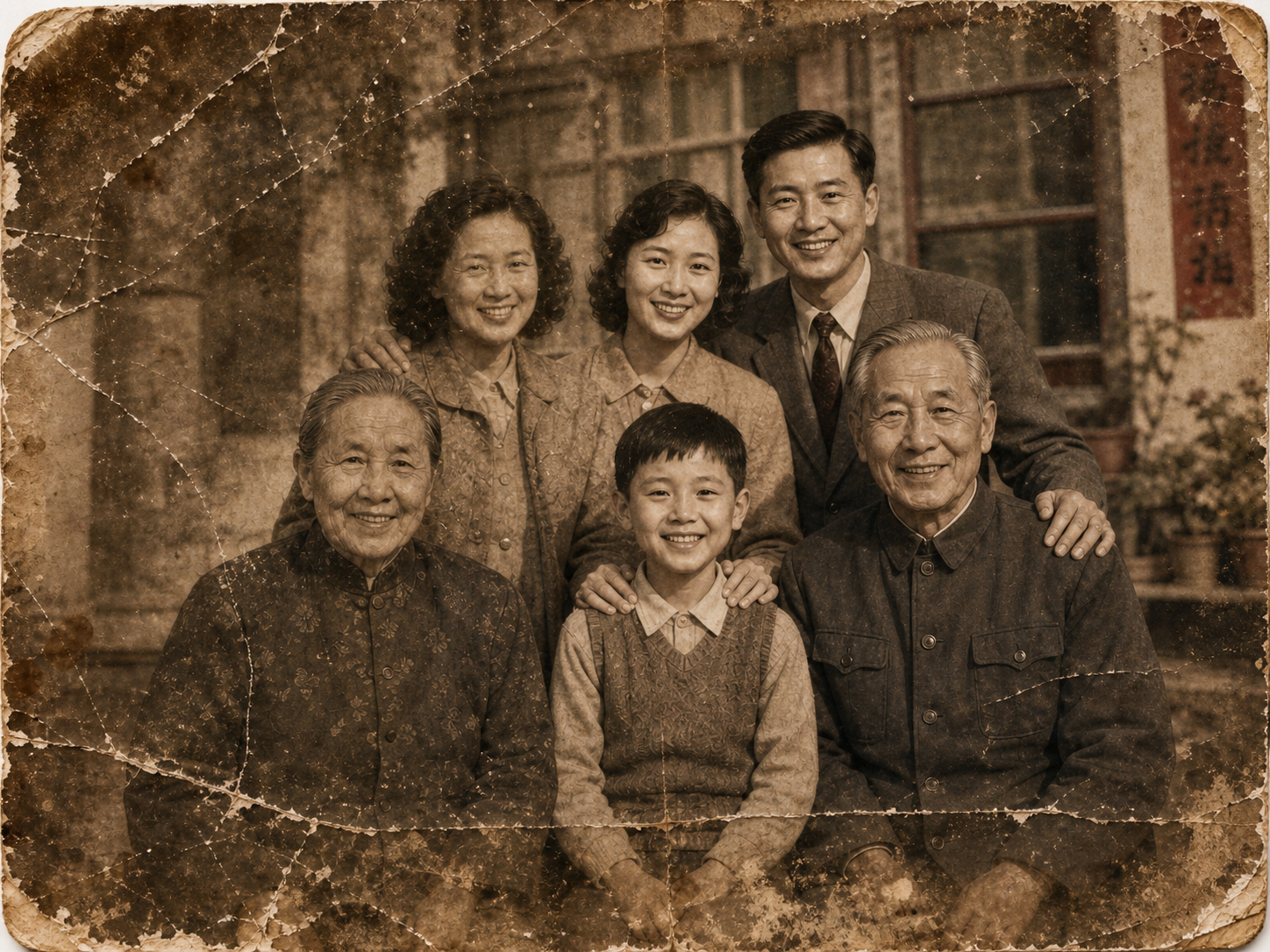
Faded family portrait, scanned from a 1960s print
Heavy sepia drift, surface scratches, soft focus across the whole frame, and the kind of low-frequency noise that a generic upscaler would sharpen into ugly artifacts. The restoration prompt locks composition and color while rebuilding the four regions that decide whether a portrait reads as in-focus — eyes, lashes, lips, and the hair-to-skin boundary — leaving the original sepia warmth and background structure intact. Drop your own photo into the editor above to run the same prompt; the output stays faithful to the input, not a glossy AI re-stylization of it.
Built for honest, faithful photo restoration
Designed for one job: bringing old photos back without rewriting them.
GPT Image 2 Engine
The same OpenAI model that powers the rest of the site. Strong portrait understanding, accurate color matching, and stable face geometry across regenerations — the qualities a restoration job actually needs.
Editable Prompt
The restoration prompt is pre-filled but not locked. If you want a softer finish, a stronger contrast lift, or to keep visible film grain, edit the wording — the form behaves like the regular generator.
Multi-Photo Batch
Restore a whole album in one pass. Drop multiple scans into the editor and each one is processed against the same restoration prompt — consistent finish across the set.
Light Tones & Background Kept
The prompt explicitly preserves light tones and background detail, so studio backdrops, doorframes, wallpaper patterns, and outdoor environments stay where they were instead of being smoothed into a generic blur.
Download Ready to Print
Output is a clean high-resolution PNG suitable for reprint, framing, or sharing with family. No watermark on paid plans.
Old Photo Restoration — FAQ
Common questions about AI-driven restoration. More questions? Email support@imagesv2.ai.
The prompt is calibrated for the most common forms of decay: overall blur, low resolution, faded contrast, mild sepia drift, and soft scratches or creases on the print surface. It does an excellent job rebuilding facial detail and natural skin texture. For severe physical damage — large tears, missing chunks of the photo, or heavy mold staining — the model can still produce a presentable result, but inpainted regions are necessarily approximations. Treat outputs as a faithful restoration, not forensic-grade reconstruction.
Yes. The prompt explicitly preserves composition and color, and GPT Image 2 has stable face geometry — features stay anchored to the original positions instead of drifting into a generic AI face. Skin texture, eye sharpness, and hair detail are rebuilt; the underlying likeness is left alone. If the input is too damaged to recover the original face, the model will produce a plausible match rather than fabricate someone else.
A pure upscaler can sharpen pixels but can't reason about what was there originally. GPT Image 2 in image-to-image mode reads the entire portrait — pose, lighting, expression, hair texture — and rebuilds plausible high-frequency detail consistent with that context. That's why the eyes look like eyes again instead of a smoother version of the same blur.
Yes. The prompt is pre-filled but fully editable. Common tweaks: ask for slightly more contrast ("lift midtones"), keep visible film grain, soften the skin texture for older subjects, or convert sepia originals to cleaner black-and-white. The default wording is a good starting point for portrait restoration; adjust freely for specific photos.
The prompt directs the model to preserve the original color palette, including light tones and background. Slight cleanup of yellow cast is normal on heavily faded prints (the eye reads it as restoration, not a color shift). If you want to keep the sepia or aged tone, add "preserve the original sepia/warm tone" to the prompt before generating.
Same as any GPT Image 2 image-to-image generation. The exact credit cost shows above the generate button before you click. New users get free credits to try the page on a few photos without paying.
Uploads are sent to OpenAI's API for processing under their data policy. We don't show your uploads to other users and don't use them to train any model. Treat the page as you would any cloud restoration service — appropriate for personal albums and family photos, not classified material.
Yes. Output is a high-resolution PNG, fine for standard reprints up to large format. For wall-size enlargements, request a higher quality tier in the form before generating.
Restore an old photo in one click
Free credits for new users. Drop in a scan, hit generate — the restoration prompt is already filled in.
