Animated SVGs written as real code — download, copy, remix

SVG Animation Generator — Type a Sentence, Watch It Come Alive

Describe the business moment in plain words and the AI writes a complete animated SVG.
Use it for websites, apps, social assets, and product demos — downloadable, copyable, and editable.

Already have a logo? Switch to "Animate my SVG" and upload it.

This generation: 10 credits

Click any example to see its real code, or describe your own idea above.

Every sample below is a live SVG

Not a video, not a GIF — each one autoplays and weighs just a few KB.

Two ways to use it

Generate a new animation from a sentence, or upload an existing SVG and add motion. Both flows are useful for reusable commercial templates.

Text to animation

Describe the scene in plain words — a diagram, a logo, a loading icon, a map — and get a moving SVG back in seconds.

Static SVG to animation

Already have a static SVG? Upload it, switch to "Animate my SVG", and we add the motion while keeping your paths exactly as they are.

High-value commercial demos

The opportunity is not just motion. It is reusable, editable motion templates.

These demos represent SVG animation patterns with stronger commercial intent: app launches, product packaging, logo intros, order status, and social creative. The product opportunity is a template system where users replace images, text, logos, colors, timing, and export formats.

Animated app campaign SVG demo
App / SaaS Launch

App campaign screen showcase

Multiple mobile screens and message layers explain a product quickly, making it useful for landing pages, paid ads, and app store previews.

Commercial scene
Mobile apps, SaaS products, AI tools, productivity tools, launch campaigns.
Productized controls
Screenshots, headline, value props, background, brand colors, CTA, landscape or portrait layout.
Animation driver
Pure CSS keyframes, 14 KB. Screen switching, copy cascade, and CTA pulse each run on their own clock — drop it in with a plain img tag.
Best outputs
Website SVG, ad GIF, short MP4, app store preview creative.
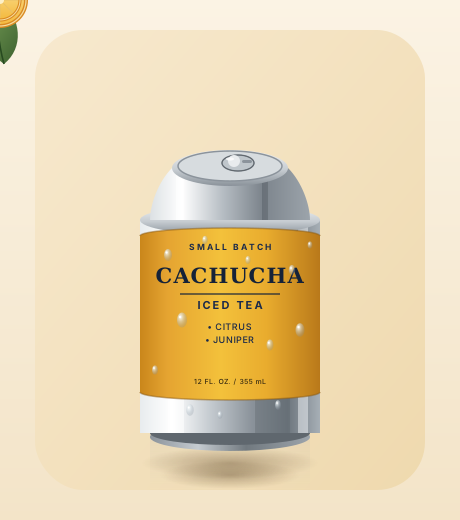
Animated product can SVG demo
DTC / Ecommerce

Product package hero motion

A product pack, fruit accents, orbit lines, and subtle floating motion turn a static product card into a reusable ecommerce hero.

Commercial scene
Food and beverage, beauty, personal care, toys, consumer electronics, product launches.
Productized controls
Product image, flavor name, background, decorative elements, claim badges, lighting rhythm.
Animation driver
Pure CSS keyframes, 13 KB. The can bob, the orbiting fruit, and the highlight sweep are three independent tracks, so swapping the product art leaves the motion intact.
Best outputs
Landing-page hero, product detail visual, social ad, campaign page asset.
Animated mobile feature cards SVG demo
Feature Marketing

Mobile feature card story

Feature cards slide, stack, and emphasize value points, making abstract app capabilities easier to understand.

Commercial scene
App onboarding, release notes, SaaS feature sections, product update pages.
Productized controls
Feature cards, icons, device frame, title, copy, card order, entrance timing.
Animation driver
Pure CSS keyframes, 8 KB. Cards enter on staggered transform and opacity — adding a fourth feature means copying one group.
Best outputs
Product-page illustration, onboarding asset, explainer video, help center visual.
Logo reveal SVG animation demo
Brand Motion

Logo reveal video intro

Logo reveals are easy to monetize as templates: upload a brand mark and generate openers, outros, and channel packaging.

Commercial scene
Company videos, YouTube intros, course openers, launch events, brand-template marketplaces.
Productized controls
Logo SVG, brand color, background, stroke speed, hold duration, intro or outro version.
Animation driver
Pure CSS keyframes, 9 KB. The mark draws on with stroke-dashoffset, the letters cascade on animation-delay. Swap the mark, keep the timing.
Best outputs
SVG intro, MP4 opener, brand motion pack, creator template.
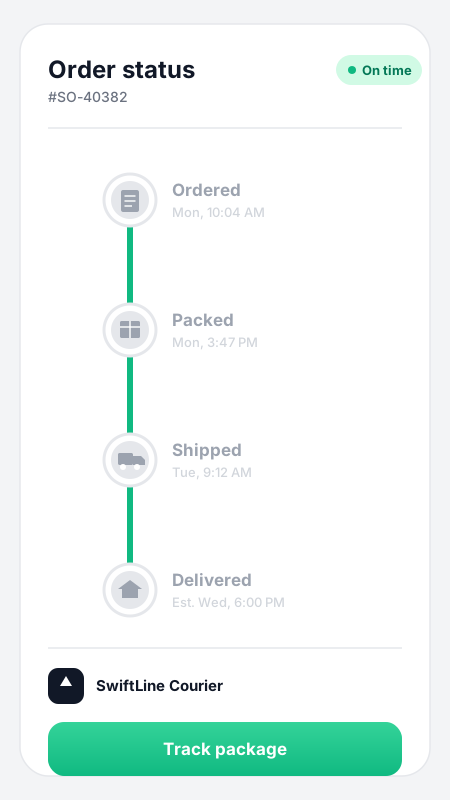
Shipment tracking progress SVG demo
UI Status

Shipment and order progress card

Status motion is commercially useful: orders, delivery, deployment, approvals, and payment success all need clear feedback.

Commercial scene
Ecommerce delivery, order status, payment success, deployment progress, approval workflows.
Productized controls
Step count, status labels, completed color, failure color, icons, node copy.
Animation driver
Pure CSS keyframes, 13 KB. One timeline drives both the line fill and the badge states, so steps can be added or removed.
Best outputs
SaaS component, checkout animation, notification center, transaction status card.
Social post motion SVG demo
Creator / Social

Social post motion template

Social templates work best as a library organized by industry and size, where users replace images, headlines, and tags.

Commercial scene
Instagram, TikTok, campaign teasers, brand content calendars, creator assets.
Productized controls
Image, headline, tags, platform size, brand colors, entrance timing, loop behavior.
Animation driver
Pure CSS keyframes, 9 KB. The image slot slowly pushes in while the text layers cascade — change the photo and the copy without touching the animation.
Best outputs
Social posts, ad creative, creator templates, campaign assets.
Editable motion prompts

Start from real product scenarios

Do not start with “make a nice animation.” Pick the business moment first, then change the object, brand colors, copy, and timing so the generated SVG is closer to something shippable.

What is the SVG Animation Generator?

Timeline editors take hours to learn; video exports blur when scaled. Here, one sentence returns a real animated SVG — readable code you can edit and embed anywhere.

From words to motion in about a minute

Type what should move and how it should feel. The AI designs the shapes and writes every keyframe — most animations are ready in well under a minute.

Animate the SVG you already have

Upload a logo, icon, or illustration and describe the motion — a draw-on reveal, a gentle float, spinning accents. Your original shapes stay untouched; only the animation is added.

Real code, not a black box

Flip to the code view any time: clean SVG markup with CSS keyframes inside. Copy it straight into your project, or tweak the timing and colors yourself.

Lighter than GIF, sharper than video

A typical animated SVG here weighs a few dozen kilobytes, scales to any resolution without blurring, and loops forever without a video player.

One generator, four kinds of motion work

From website polish to classroom explainers — the same one-sentence workflow covers the animation tasks people actually have.

Animated loading spinner: a gradient ring with orbiting dots

Interface states and flows

Checkout progress, signup steps, loading spinners, empty states, animated 404s. The moments where someone is waiting or deciding — drop one in with a plain img tag and it starts playing on its own, nothing to wire up or maintain.

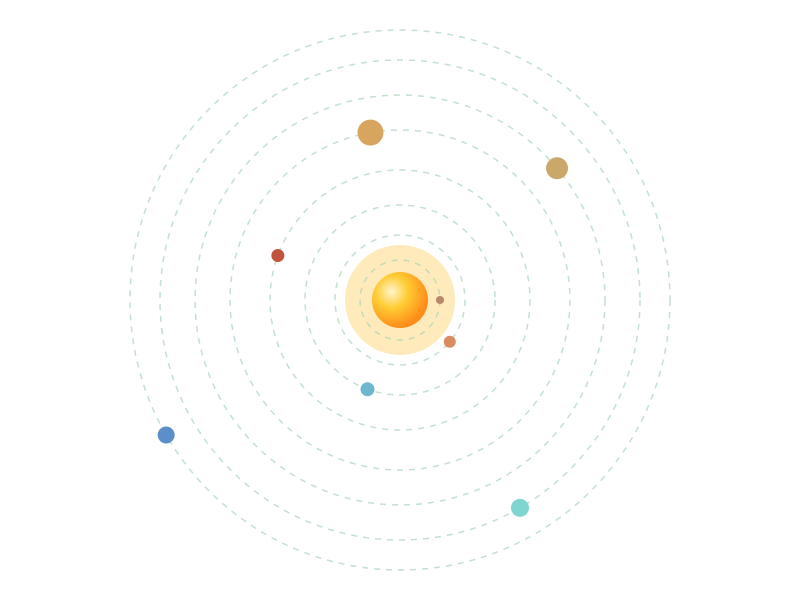
Animated solar system diagram with 8 planets orbiting the sun

Explainer visuals for teaching and content

Orbiting solar systems, animated timelines, working-principle diagrams, growing bar charts. Describe the concept and drop the result into slides, articles, or course pages — it plays on its own, no video player needed.

Typewriter text animation revealing 'Hello World' in bold orange

Brand moments and site polish

Hand-lettering that draws itself, kinetic headlines, logo reveals, drifting hero backgrounds. Vector-sharp on every screen, small enough to load instantly.

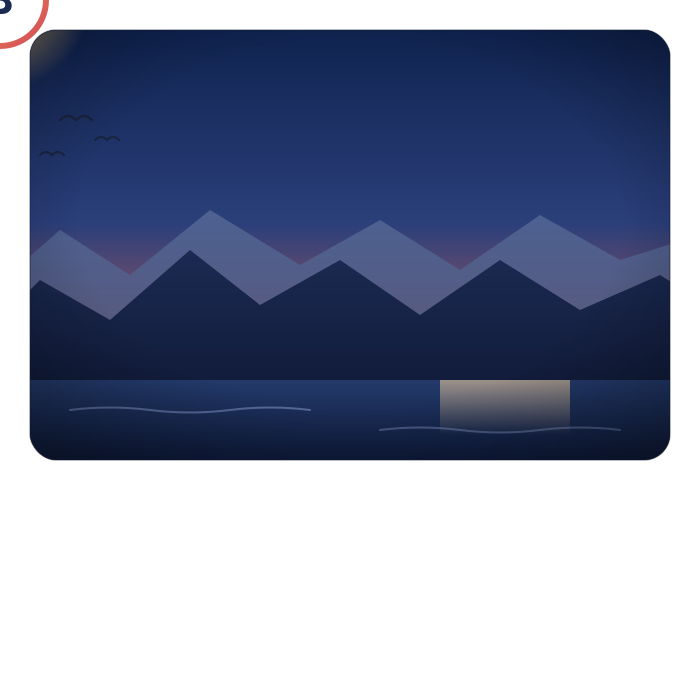
A mountain-and-sun line icon that draws itself, then fades and loops

Paste it anywhere and it keeps moving

A GitHub README, a Notion page, a shared doc, a slide deck. Most animated files go still the moment they leave the site they were built for — these carry their motion with them.

One prompt, every engine

You pick a tier, not a model ID. Switch engines and run the same prompt again to compare for yourself.

Fast — Gemini 3.6 Flash

Speed first, 10 credits. Best when you are iterating on wording and want the next attempt on screen quickly.

Balanced — Claude Sonnet 5 (default)

The default tier, 10 credits, and the one engine we have measured end to end on our own animation prompts: clean markup, reliable CSS keyframes, typically 12-32 seconds.

Best — Kimi K3

15 credits, reasoning left on. Slower and pricier, aimed at busy scenes with a lot of elements to choreograph.

Take it anywhere

SVG is the native output. GIF and MP4 are rendered right in your browser — no extra credits, no upload.

SVG

The real artifact. CSS keyframes live inside the file, so it plays with no runtime library — drop it in an img tag or paste it inline.

GIF

One click, for the places that will not take an SVG upload — chat apps and social feeds. Rendered frame by frame from your animation, on your machine.

MP4

For short-form video, slide decks, and course material. Encoded locally in browsers that support it; SVG and GIF work everywhere regardless.

Everything you need to make vectors move

This is more than a moving graphic: it covers prompting, preview, source code, export, and reuse in one workflow.

Templates that speak your task

Loading spinner, self-drawing logo, typewriter text, wave background, line-drawing reveal, growing chart — pick a template, tweak the words, generate.

Pure CSS-in-SVG output

No JavaScript, no external assets, no runtime library. The animation is declarative CSS inside the SVG itself — safe to inline, easy to cache, plays even inside an img tag.

Crisp from favicon to billboard

It is a vector: the same file stays perfectly sharp as a 16px icon or a full-screen hero. No re-exporting at different sizes.

Code view and one-click copy

See exactly what the AI wrote. Copy the markup into your codebase, adjust a duration, swap a color — it reads like code a careful human would write.

Turn your static SVG into motion

The svg-to-animation path: upload any existing SVG and describe the movement. Great for logos you already shipped and icons you already love.

Swap the engine behind the prompt

Claude Sonnet 5 writes the markup by default — precise vector code is what that family is best at. Prefer something faster or heavier? Switch tiers, or name an engine outright in advanced settings.

SVG Animation Generator — FAQ

Common questions about generating animated SVGs. More questions? Email support@imagesv2.ai.

The sweet spots are declarative motion — animations that play a defined choreography:
(1) Web and UI assets — loading spinners, self-drawing logos, wave backgrounds, animated 404s.
(2) Text effects — typewriter reveals, kinetic type, hand-lettering that draws itself.
(3) Explainer visuals — orbiting planets, timelines, growing charts, working-principle loops.

Not the right tool for: JavaScript-driven simulations or games (physics with live numbers, interactive applets); static logos and illustrations — use the GPT Image 2 SVG Generator; flowcharts and diagrams — use the AI SVG Diagram Generator.


Yes — that is literally how this page works by default. Anthropic's Claude Sonnet 5 writes the SVG markup and the CSS keyframes directly, shape by shape and frame by frame. Writing vector code from a text description is one of the tasks frontier models have become remarkably good at, and Claude is consistently among the strongest at it. It is not the only option here, though: the tier switcher also runs Gemini 3.6 Flash and Kimi K3, and advanced settings let you name GPT-5.6, DeepSeek V4 Flash, or MiniMax M3 directly. Type a sentence above, then open the code view to see exactly what your engine wrote.


For anything on a website, animated SVG wins on every axis: a few dozen kilobytes instead of megabytes, perfectly sharp at every zoom level, infinite smooth looping, and editable code instead of baked pixels. GIF still has one advantage — it plays on platforms that do not accept SVG uploads (some chat apps and social feeds). Rule of thumb: SVG for your own website, slides, and docs; GIF only where the platform forces it. You do not have to choose up front: every generation exports to GIF and MP4 from the same result, rendered in your browser at no extra credit cost.


Two ways:
(1) As an image — upload the .svg and reference it in a normal img tag. CSS keyframe animations inside the file play automatically.
(2) Inline — copy the code from the code view and paste it into your HTML. Inline is the way to go if you want hover-triggered effects, since interaction states only work when the SVG lives in the page.
Either way there is no script to load and nothing else to install.


No. The output is pure declarative animation — CSS keyframes (and occasionally SMIL) inside the SVG file itself. No GSAP, no Lottie player, no runtime. That is what makes it safe to inline, fast to load, and portable across every modern browser. One honest caveat: most email clients freeze SVG animations, so for newsletters a GIF is still the safer choice.


Yes — that is the second mode. Upload your SVG, describe the motion you want (draw the outline stroke by stroke, float gently, pulse the accent color), and the AI adds the animation while keeping your original shapes intact. If your logo only exists as a PNG or JPG, first convert it with the GPT Image 2 SVG Generator, then animate it here.


Yes, and both are free. SVG is the native artifact; GIF and MP4 are produced by replaying your animation frame by frame inside your browser — nothing is uploaded, and no extra credits are charged. Use GIF where SVG uploads are not accepted, and MP4 for short-form video, slides, and course material. MP4 encoding needs a browser with WebCodecs (Chrome, Edge, and recent Safari have it); where it is missing, SVG and GIF still work and the MP4 button simply stays disabled.


10 credits per generation, the same as the other SVG tools on this site. New users get free credits to try it out.


Most animations are ready in well under a minute. Scenes with many elements or long choreography can take up to two minutes — the AI is writing every shape and keyframe by hand.


Yes. The animations you generate are yours and free for commercial use — on client projects, in products, and in paid content.


Bring your first vector to life

One sentence in, one animated SVG out — sharp at every size and ready to embed anywhere.