
GPT Image 2 Online Generator
Photorealistic AI images with razor-sharp text rendering.
Free credits for new users — no OpenAI account, no ChatGPT Plus, no prompt skills needed.
Free GPT Image 2 credits for new users — no credit card, no OpenAI account
Start with curated cases. Create standout images.
Curated high-quality GPT Image 2 image examples with prompts you can reuse. Find a result you like and start creating.

Guangdong Super League Invitation Poster

Taobao Product Detail-Page Section

E-Commerce Sale Banner

Product Ad Redesign

Dynamic Splash Product Ad

Y2K Scrapbook Collage Poster

Korean Idol 3x3 Collage Portrait

Educational Cross-Section Diagram
USE CASES
GPT Image 2 Use Cases for Every Industry
Choose a starting point for the images your day-to-day work needs.
E-commerce operators
Create product heroes, sale banners, and detail-page visuals for your store.
Brand and event teams
Turn a launch, campaign, or event brief into a polished poster and key visual.
Content creators
Turn a post idea into a polished social screenshot and shareable visual.
Educators and knowledge teams
Explain a process, object, or idea with clear diagrams and structured visual notes.
Product and brand designers
Explore app mockups, color directions, and brand kit pieces before the handoff.
Comic and story creators
Develop characters, storyboards, and sequential comic scenes from an early idea.
Step Into a World From One Sentence
Type a place and time. GPT Image 2 auto-appends the five panorama keywords and returns a true equirectangular panorama you can drag, zoom and walk into.


GPT Image 2 Writes the Tweet, Renders the Screenshot
Type a topic or vibe. GPT Image 2 drafts a viral-style tweet and renders it as a pixel-accurate X (Twitter) single-tweet screenshot — themeable, editable engagement counts, exports a 1500px PNG.


One Scene Prompt, GPT Image 2 Writes the Whole Chat
Type a scene like "customer follow-up" or "referral intro" — GPT Image 2 drafts a natural conversation and renders it as a 750×1334 WeChat chat screenshot. Every line is editable, exports as PNG.


Customer · Alex


Customer · Linda


Mentor · Mr. Zhang


Partner · Mr. Wang
Turn one sentence into a fully composed GPT Image 2 infographic
Food maps, science encyclopedia spreads, museum breakdowns, travel guides — GPT Image 2 covers every "image with text" need in a single shot. Ready for social, slides or blog.
The five figures below were generated by this very tool, illustrating a fable about diffusion models we wrote in-house.


Upload one photo, GPT Image 2 returns a complete style analysis
Real face preserved. GPT Image 2 compares hairstyle, makeup, color and jewelry as best fit / neutral / avoid — all on a single 2:3 poster. A pro stylist's report on one image.
- Hairstyle compare
- Makeup analysis
- Color try-on
- Jewelry pairing
One selfie, a dozen pro-level GPT Image 2 looks
Cinematic 35mm film, editorial black-and-white, LinkedIn headshot, Korean ID photo, 3D figurine — same face, different stylists. GPT Image 2 keeps the likeness, swaps the styling.


Which colors actually flatter your skin? GPT Image 2 tells you on your real face
GPT Image 2 infers your undertone, then renders best vs avoid clothing colors side by side on your real face — clear at a glance which colors brighten or dull your complexion. Pull it up before you shop.
- Undertone detection
- Best-color try-on
- Avoid-color callouts
- Side-by-side compare

Phone wallpapers in one GPT Image 2 click
Low-saturation palette, geometric blocks, subtle film grain, 9:16 portrait ready for the lock screen. 18 GPT Image 2 scene templates — seaside, snowy night, cherry blossom, starry sky — copy-paste and go.

Dusk seaside cabin
Use this scene
Spring flower field
Use this scene
Winter snowy village
Use this scene
Moonlit forest lake
Use this scene
Starry-sky tent
Use this scene
Cherry blossom path
Use this scene+12 more scenes
GPT Image 2 turns any photo into a Japanese-journal diary page
Upload an everyday snapshot. GPT Image 2 lays down 8–12 hand-drawn annotations with diary-style notes — and the same prompt fires natively in Chinese, English, Japanese, German. Four real outputs in four languages below.
 中文
中文Night market · Chinese notes
Try it Deutsch
Café desk · German notes
Try it English
Weekend brunch · English notes
Try it 日本語
日本語Lunch memo · Japanese notes
Try it English
Convenience store · English notes
Try it Deutsch
Office desk · German notes
Try itOne prompt — the model writes the annotations in whichever language you pick. Chinese, English, Japanese, German all flow natively.
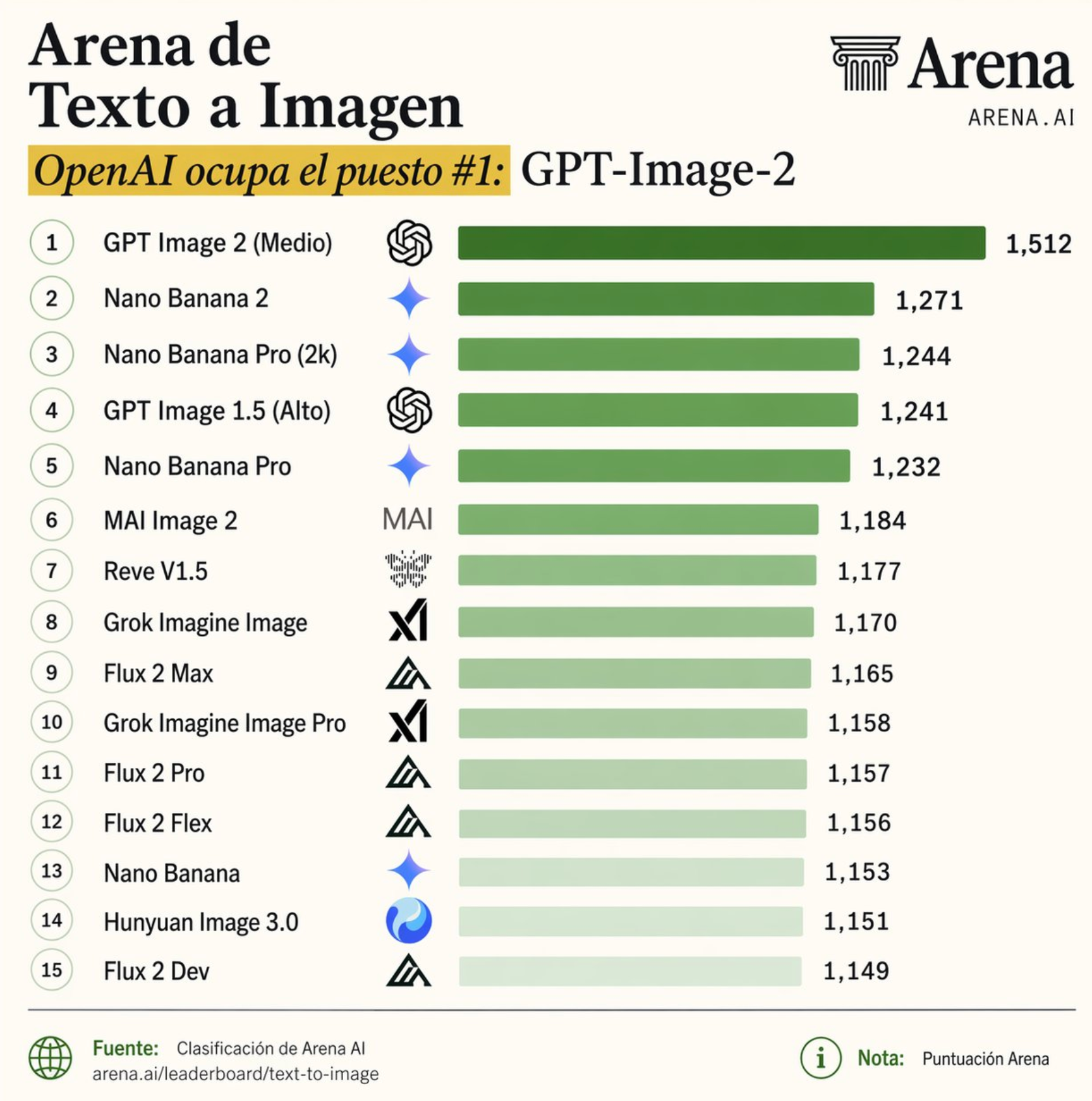
What is GPT Image 2? (also written gpt-image2, gpt image v2 or ChatGPT image 2)
GPT Image 2 is OpenAI's next-generation image model, released April 21, 2026 (model snapshot gpt-image-2-2026-04-21). Also written gpt-image-2, gpt image2, chatgpt image 2, gpt image v2 or gpt image gen 2 — these all refer to the same model. A generational leap in text rendering, photorealism, multilingual accuracy (~95% on CJK / Arabic), and native O-series reasoning.
Perfect Text Rendering
GPT Image 2 renders crisp, accurate text inside images — posters, logos, UI mockups, even CJK characters. No more garbled fonts.
Photorealistic Output
Skin textures, lighting physics, and material reflections from GPT Image 2 rival real camera shots. The AI plastic look is gone.
Natural Language Editing
Edit GPT Image 2 results with plain English — inpaint, outpaint, swap elements, and transfer styles in a conversational workflow.
Transparent Backgrounds
One-click GPT Image 2 cutout with transparent PNG export — perfect for product photos, stickers, and design assets.
Editable SVG Output
GPT Image 2 generations vectorized to clean editable SVG — paths, layers, theme-able colors. Open in Figma, Illustrator, or any vector tool. Perfect for icons, logos, flat illustrations.
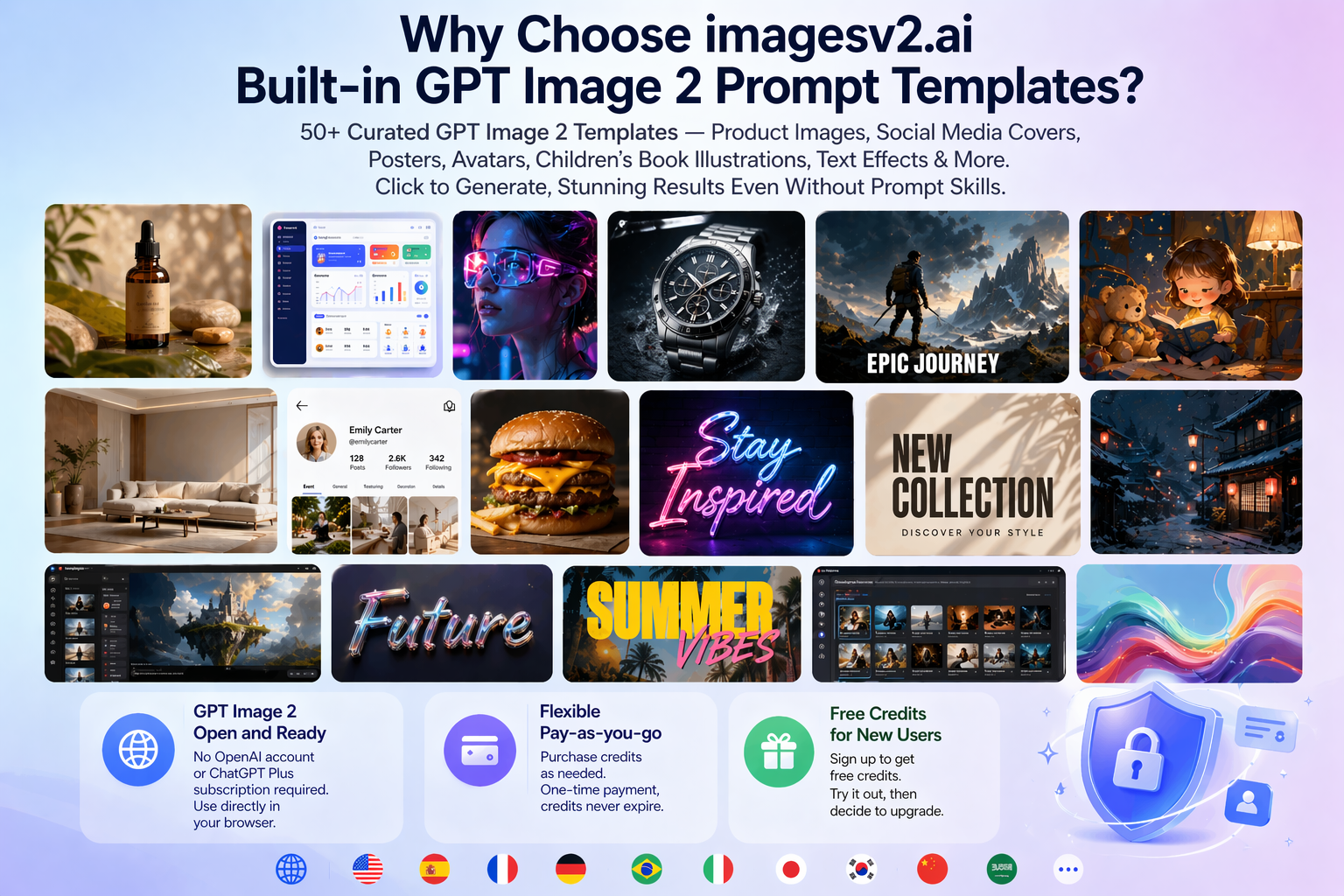
What Can GPT Image 2 Do? — Posters, Menus, Product Shots, and More
GPT Image 2 use cases on imagesv2.ai — transparent PNG, editable SVG, and 50+ ready-to-use templates that drop GPT Image 2 straight into your design workflow.
Real RGBA Transparent Background — One Click
GPT Image 2 doesn't natively support transparent output — we built an alpha cutout pipeline on top. Pick "Transparent" and download a real RGBA PNG with feathered alpha edges. Drop straight into Photoshop, Figma, or any layered design tool — verified live on a checkerboard preview before you download.
Editable SVG Vector Output
Pick "SVG" as the GPT Image 2 output format and the generation is auto-vectorized into a clean path file — open in Figma, Illustrator, or any vector tool to keep editing text, colors, and shapes. PNG is also returned as a fallback. Best for icons, logos, flat illustrations.
50+ Built-in Prompt Templates
Product photos, social media covers, posters, avatars, children's book illustrations — click any GPT Image 2 template and generate, no prompt skills needed.
GPT Image 2 Features: Sharp Text, 4K Output, Transparent PNG
Sharp multilingual text, 4K output, real RGBA transparent PNG, editable SVG, natural-language editing, and multi-image consistency. From photo to pixel, manga to cinema — one model, every visual scenario.
Precise Text Rendering
Poster headlines, UI copy, product logos, chart labels — GPT Image 2 renders them correctly in one shot, small type stays sharp, layout holds, multi-language (EN / ZH / JA / KO) without garbled characters. The diffusion-era text-rendering problem, systematically solved. No more Photoshop touch-ups.
Photorealism
Lens vignetting, film grain, depth-of-field blur — even subtle imperfections are preserved. GPT Image 2 output is indistinguishable from a camera capture.
Cinematic Stills
Widescreen framing, cinematic color grading, dramatic lighting reproduced with precision — Netflix-grade GPT Image 2 stills from a single prompt.
Pixel Art
Crisp pixel alignment, clean color-block edges, authentic low-res aesthetics — consistent 8-bit / 16-bit retro game art from GPT Image 2.
Manga & Anime
Clean linework, screentone shading, panel composition — GPT Image 2 renders the Japanese manga visual language natively with consistent characters.
Illustration & Design
Watercolor, flat design, 3D render, poster typography — GPT Image 2 keeps textures, lighting, and composition stable across every art style.
CREATOR STORIES · ILLUSTRATIVE SCENARIOS
Bring Creative Ideas to Life with GPT Image 2
Illustrative scenarios from the kinds of work creators bring to imagesv2.ai.
Comic creator: imagesv2.ai finally helps me draw the story I have been carrying around. I describe the characters, try a few story panels, and shape the sequence until the scene feels alive; I spend less time redrawing early drafts and can finish a short comic page to share.
imagesv2.ai finally helps me draw the story I have been carrying around. I describe the characters, try a few story panels, and shape the sequence until the scene feels alive; I spend less time redrawing early drafts and can finish a short comic page to share.

Comic creator
Sequential stories
Plans & Pricing of GPT Image 2
Choose the plan that works best for you. All plans include access to our core features. Want a deeper breakdown of GPT Image 2 cost per image, what's included in each tier, and how credits map to resolutions? → See GPT Image 2 Pricing details
GPT Image 2 Flash Sale
Limited-Time 50% OFF
Cancel anytime.
Starter
Save $51 annually · $0.0042 per credit
Includes
- 1,000 credits delivered monthly
- Actual credit cost is shown before generation
- Unused credits expire at month end
- 6 months free vs monthly
- All generation features
- Watermark-free downloads
- Cancel anytime
Pro
Save $207 annually · $0.0033 per credit
Includes
- 5,000 credits delivered monthly
- Actual credit cost is shown before generation
- Unused credits expire at month end
- 6 months free vs monthly
- 20% cheaper per credit than Starter
- All generation features
- Priority generation queue
- Commercial license
- Priority support
- Watermark-free downloads
- Cancel anytime
Ultra
Save $519 annually · $0.0021 per credit · lowest
Includes
- 20,000 credits delivered monthly
- Actual credit cost is shown before generation
- Unused credits expire at month end
- 6 months free vs monthly
- 50% cheaper per credit than Starter
- All generation features
- Highest priority generation
- Early access to new models
- Dedicated customer support
- Commercial license
- Watermark-free downloads
- Cancel anytime
GPT Image 2 — Frequently Asked Questions
Common questions about GPT Image 2 and imagesv2.ai. Have more questions? Contact us at support@imagesv2.ai.
GPT Image 2 is OpenAI's next-generation image model, succeeding GPT Image 1.5. It delivers breakthrough improvements in text rendering, photorealism, world knowledge, and spatial reasoning. imagesv2.ai provides easy access to this model via a simple web interface. Also written gpt-image2, gpt image2, gpt image v2, gpt image gen 2, or ChatGPT image 2 — these all refer to the same model.
We aggregate multiple image generation models including GPT Image 2, GPT Image 1.5, GPT Image 1, Nano Banana, Nano Banana 2, Nano Banana Pro, and more. You can compare outputs from different models side by side and choose the best result — all from one platform.
New users get free GPT Image 2 credits to experience the full generation capability — no credit card required. After that, GPT Image 2 pricing offers three options to match how you use it: a yearly subscription with up to 50% off, a monthly subscription for flexibility, or one-time credit packs that never expire. See full GPT Image 2 prices on our pricing page.
No. imagesv2.ai provides direct browser access to GPT Image 2 — no OpenAI account, no ChatGPT Plus subscription required. We also offer more flexible payment options than OpenAI directly.
Absolutely no skills needed. We provide 50+ built-in GPT Image 2 prompt templates covering common scenarios — product photos, social media covers, posters, avatars, children's book illustrations, and more. Just click a template, edit a few words, and generate. No prompt engineering required.
Almost anything visual: product photos, social media covers, YouTube thumbnails, posters with accurate text, restaurant menus, UI mockups, game concept art, avatars, and more. You can also one-click generate 1:1 (Instagram), 16:9 (YouTube), and 9:16 (TikTok) versions for multi-platform publishing.
Yes. GPT Image 2 renders multilingual text at ~95% accuracy — Simplified Chinese, Traditional Chinese, Japanese, Korean, Arabic, and 20+ other scripts. This is a major upgrade over GPT Image 1.5, which often produced garbled non-Latin glyphs. Use it on posters, menus, social media covers, or product packaging — write your prompt in any language and the model lays out the text correctly.
Yes. GPT Image 2 introduced native multi-image consistency — generate a series of images and the same character, mascot, or visual style carries through. Useful for children's book illustrations, brand campaigns, comic panels, and product variants. Earlier models like GPT Image 1.5 and DALL·E 3 couldn't reliably do this without heavy prompt engineering.
Both. Upload an image and describe the change in plain English — "remove the background", "change the shirt to red", "add neon signs in the back" — and GPT Image 2 will edit it. imagesv2.ai supports drag-and-drop image upload and reference-guided generation. The image-to-image mode preserves the original composition while applying your requested changes.
GPT Image 2 was released by OpenAI on April 21, 2026 (model snapshot gpt-image-2-2026-04-21). It succeeded GPT Image 1.5 and is OpenAI's first image model with native O-series reasoning. imagesv2.ai integrated GPT Image 2 on launch day — you can try it right now without an OpenAI account.
GPT Image 2 leads in text rendering accuracy (~95% multilingual) and photorealism. Nano Banana Pro and Nano Banana 2 are Google's competing models — and despite the names, they are two different models: Nano Banana Pro is Gemini 3 Pro Image, Google's flagship, while Nano Banana 2 is the newer Gemini 3.1 Flash Image, faster and cheaper. Both are generally quicker than GPT Image 2 and strong on stylized illustration. imagesv2.ai supports them side by side — see the full comparison on our GPT Image 2 vs Nano Banana Pro page, or the dedicated Nano Banana 2 page.
DALL·E 3 was OpenAI's previous image model, now superseded by GPT Image 2. Key upgrades: text inside images is sharp instead of garbled, photorealism handles human faces and product shots reliably, and the model now reasons about layout before generating. If you used DALL·E 3 or gpt image2 before, GPT Image 2 is a drop-in upgrade — same prompt style, much better output.
Yes — GPT Image 2 supports 4K output (and 1K / 2K), available on imagesv2.ai. GPT Image 2 was released alongside the Codex update in OpenAI's April 21, 2026 launch — both share the same O-series reasoning backbone, but Codex is for code while GPT Image 2 is for images. You don't need Codex access to use GPT Image 2 here.
Yes. Images generated through imagesv2.ai with GPT Image 2 are yours to use commercially — product photos, ads, posters, social media, e-commerce listings, even merchandise. No additional licensing fee. OpenAI's usage policy permits commercial use of GPT Image 2 outputs subject to their content policy.
Yes. imagesv2.ai has a dedicated optimization for GPT Image 2 that delivers one-click transparent PNG output. Pick "Transparent" under Background on the generation panel, write your prompt, hit Generate — what you download is a real RGBA PNG with soft alpha edges, ready to drop straight into Photoshop, Figma, PowerPoint, an e-commerce listing, or any tool that respects PNG transparency. The preview area uses a checkerboard backdrop so you can confirm the alpha before downloading. Costs 10 extra credits per image vs. the standard mode. GPT Image 1 and GPT Image 1.5 also support transparent background — switch models depending on the style you want.
Yes. imagesv2.ai has a dedicated optimization for GPT Image 2 that adds editable SVG vector output. OpenAI's Image API only emits raster formats (PNG / JPEG / WebP), so we layered an automatic vectorization pipeline on top — pick "SVG" under Output Format on the generation panel, write your prompt, hit Generate, and you get both the high-resolution PNG and a clean editable SVG. The SVG opens in Figma, Illustrator, Inkscape, or any vector tool to keep editing text, colors, and shapes. Best for icons, logos, and flat illustrations — photorealistic content doesn't vectorize cleanly. For the full workflow with style presets, visit the dedicated GPT Image 2 SVG Generator page. Costs 10 extra credits per image vs. the standard mode.
Use GPT Image 2 Free Online — Start in 3 Seconds
Free GPT Image 2 credits for new users. No OpenAI account, no ChatGPT Plus subscription, no prompt skills needed — just type and generate.
