
A character sheet prompt is a structured instruction that makes an image model render the same character from multiple angles, in multiple expressions, with the face, hair, outfit, proportions and palette held constant across all of them.
It is not a prompt for one nice illustration. It is a prompt for a reference document — the thing you hand to an illustrator, a 3D modeler, an animator, or your next twenty generations, so the character stops drifting.
Stop reading prices — generate one for free first
Sign up and get 3 free credits — enough for one image. No credit card.
Quick disambiguation. If you landed here looking for a novel-writing character profile (name, backstory, motivations) or a tabletop RPG character sheet (stats, ability scores, printable PDF), this isn't that. This page is about prompts for AI image generators — turnarounds, expression charts, and visual consistency.
What a character sheet actually contains
The format predates AI by decades — animation studios call it a model sheet, game studios call it a character reference sheet, and the multi-angle portion is a turnaround. A complete one usually holds:
- Full-body front view — proportions, outfit front, footwear, accessories.
- Three-quarter view — the angle that reveals facial structure and hair volume best.
- Left and right profiles — nose bridge, hair silhouette, side tailoring of the outfit.
- Back view — back of the garment, hair from behind, backpack, cape, rigging.
- Expression grid — neutral, happy, angry, surprised, sad, confused, smug.
- Detail close-ups — eyes, earrings, weapon, insignia, shoes, fabric texture.
- Color specification — primary, secondary, skin/hair/garment values, ideally as hex.
- Scale notes — height, proportion guides, material callouts.
You rarely need all of it in one image. The most reliable single output is four columns — front / side / back / ¾ — with a matching head close-up under each.
Why AI image generation needs this more than traditional art does
Traditional illustrators carry the character in their head. Image models do not — they re-derive the character from your input every single time. The classic symptoms:
- The face changes when the angle changes. You asked for a side view of the same person and got a different person.
- You can't get a clean front/side/back row in one pass — the model gives you three loosely related characters standing next to each other.
- Expression sheets drift. Ten emotions, nine faces.
This is character drift, and it's the single biggest blocker to using AI images for anything serialized — comics, storyboards, game NPCs, a brand mascot, an AI-run social account, tutorial illustrations.
Worth saying up front: symptoms 1 and 2 are substantially better on current models than the guides written a year ago assume. We tested it, and the results are further down — they're not what this article originally claimed. What has not gone away is the harder version of the problem: keeping one specific character stable across many separate generations, days apart. That's what a character sheet is for.
A character sheet prompt attacks the problem at the root: define the character once, precisely enough that it becomes a reusable visual baseline. The payoff compounds:
- Downstream consistency — later generations reference the sheet instead of re-inventing the character.
- Production handoff — a single pretty render is a demo; a character sheet is an asset a designer or modeler can actually work from.
- Less prompt roulette — once the face, outfit, palette and material are locked, you only vary scene, pose, camera and mood.
- Reusable IP — for a solo developer this is how a mascot or story character survives past the first post.
The practical rule: specificity beats adjectives. "A sci-fi girl" leaves the model to invent body type, garment material, color and rendering medium — and it will invent differently each time. Every attribute you leave unspecified is an attribute that will drift.
The anatomy of a character sheet prompt
Six blocks. Every strong character sheet prompt has all six, whether or not the author labeled them.
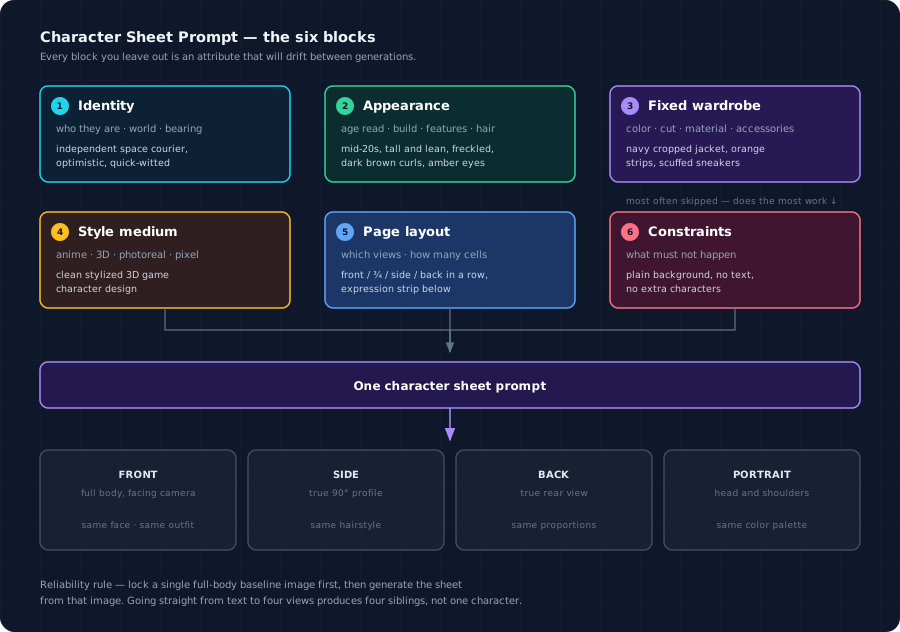
| Block | What goes in it | Example |
|---|---|---|
| Identity | Who they are, the world they live in, their bearing | Independent space courier — optimistic, quick-witted, pragmatic |
| Appearance | Age read, build, skin, features, hair | Mid-20s, tall and lean, freckled, dark brown curls, amber eyes |
| Fixed wardrobe | Color, cut, material, accessories | Navy cropped jacket, orange reflective strips, grey cargo trousers, scuffed sneakers |
| Style medium | Anime, 3D, photoreal, pixel, painterly | Clean stylized 3D game character design |
| Page layout | Which views, how many cells, arrangement | Front / ¾ / side / back in a row, expression strip below, palette bar at the bottom |
| Constraints | What must not happen | Plain white background, consistent proportions, no text, no extra characters |
The block people skip is constraints, and it's the one doing the most work — though, as the test runs below show, not the work most people think. It doesn't hold the character together. It holds the page together: without it the model fills empty space with props, adds its own label bar, or duplicates the character.
Copy-paste prompts
1. Short — text to character sheet
Generate a full-body turnaround of one character plus a face close-up.
Layout: the left third is one oversized face close-up; the right two thirds hold
front view, side view and back view in a row. Head-to-body ratio roughly 1:8.
Plain solid background. Consistent proportions across all views. No text.
Use this when you're still exploring who the character is. Run it a few times, pick the sheet whose face you like, then move to prompt 2 with that image as reference.
2. Long — image to character sheet, identity locked
Using the uploaded photo as the sole appearance reference, produce a four-cell
character sheet:
  FRONT    — full body, facing camera
  SIDE     — true 90° profile, full body
  BACK     — true rear view, full body
  PORTRAIT — head-and-shoulders close-up

Same person, same outfit, same hairstyle in all four cells. Keep facial
features, body proportions, garment color and hair length identical across
cells. Neutral grey studio backdrop, even softbox lighting, clean column
spacing.

Do not beautify, restyle the face, change the outfit, or add accessories that
are not in the reference. No text, no extra characters, no duplicated limbs.
This is the one to use when the character has to outlive a single image. The reference locks which person you get; the constraint block locks what the page looks like around them.
3. Downstream — using the sheet in AI video
Use the provided turnaround sheet as the only appearance reference for this
character. The sheet exists to define front / side / back appearance only — do
not compose the turnaround layout into the video frame. Maintain identical body
type, eye color and signature accessories across every shot.
Character drift across shots is the reason most AI video work looks unusable at length. Feeding a turnaround in as the appearance anchor — with an explicit instruction not to render the sheet itself — is the current best answer.
4. Full kit — the eight-module sheet for AI video production
Create a professional AI Video Production — Character Reference Sheet for the provided character image. Create a polished 4:5 portrait continuity sheet focused exclusively on the character:

1. CHARACTER PROFILE — name, role, approximate age, height, body type, personality, distinctive traits, and signature colors.
2. FULL-BODY TURNAROUND — front, 3/4, side, and back views of the exact same character at matching scale, with identical facial features, hairstyle, body proportions, costume, colors, and accessories.
3. FACE AND IDENTITY DETAILS — front, profile, and 3/4 head-and-shoulder close-ups showing facial structure, eyes, eyebrows, nose, lips, hairstyle, skin tone, makeup, scars, tattoos, and other defining features.
4. EXPRESSION SHEET — neutral, happy, angry, sad, surprised, worried, confident, and determined expressions. Preserve the exact same facial structure and identity in every expression.
5. POSE AND BODY LANGUAGE — neutral standing, walking, sitting, relaxed, tense, and action-ready poses. Maintain consistent anatomy, proportions, posture, and silhouette.
6. COSTUME DETAILS — close-ups of clothing layers, fabrics, seams, fasteners, footwear, jewelry, eyewear, markings, logos, and other character-defining wardrobe elements.
7. COLOR AND MATERIAL PALETTE — include 4–6 key colors with HEX codes, plus references for skin, hair, fabric, leather, metal, plastic, armor, or other visible materials.
8. DO NOT CHANGE — lock the character's face, identity, skin tone, age, hair, eye color, body shape, proportions, costume, accessories, markings, colors, and defining features. Do not redesign, beautify, age, stylize, simplify, or create alternate versions.

Use a clean dark gray studio background, soft controlled lighting, realistic materials, sharp details, subtle shadows, clean typography, thin dividers, balanced spacing, and a sophisticated editorial production-design grid.

Every panel must depict the exact same character with absolute visual consistency. Focus only on the character. Do not include props, additional characters, environments, unrelated objects, or alternate outfits.
This one doesn't ask for a turnaround. It asks for a whole video-production handoff document on one 4:5 page: profile, turnaround, face close-ups, expressions, poses, costume details and palette. It needs a reference image. See "The full-kit case" below for the output.
Best to pick a plan after you've seen what it makes
Spend your 3 free credits on one image, then decide which plan fits.
What actually happens when you run these
We ran prompts 1 and 2, plus a stripped-down version of prompt 2, on GPT Image 2 at medium quality, three generations each, no cherry-picking. Two of the results contradicted what this article was originally going to tell you, so here is what the model actually did.
| Across 3 runs each | Text only | Reference + long constraints | Reference + two words |
|---|---|---|---|
| Layout came out as asked | 3/3 | 3/3 | 3/3 |
| Views match each other | 3/3 | 3/3 | 3/3 |
| Big close-up matches the small figures | 0/3 | 3/3 | 3/3 |
| Portrait cell framed as head-and-shoulders | — | 0/3 (asked for it) | 3/3 (never asked) |
| No stray text on the sheet | 3/3 | 3/3 (asked for it) | 0/3 (never asked) |
| Re-running gives the same character | 0/3 | 3/3 | 3/3 |
The reference
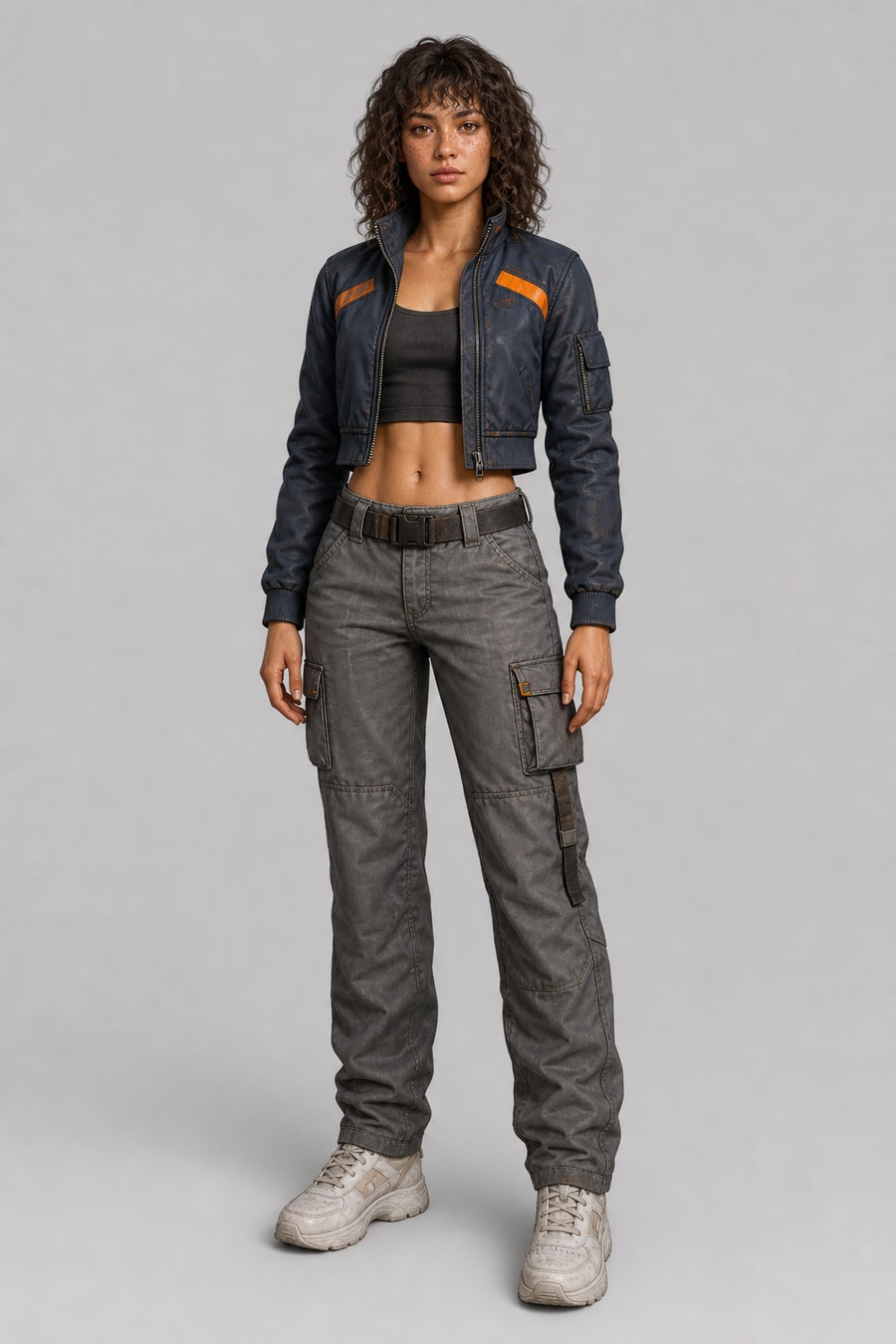
One text-to-image pass, full body, neutral pose, plain backdrop. This becomes the appearance reference for the two image-to-image runs below.
Prompt 1 — text only, no reference
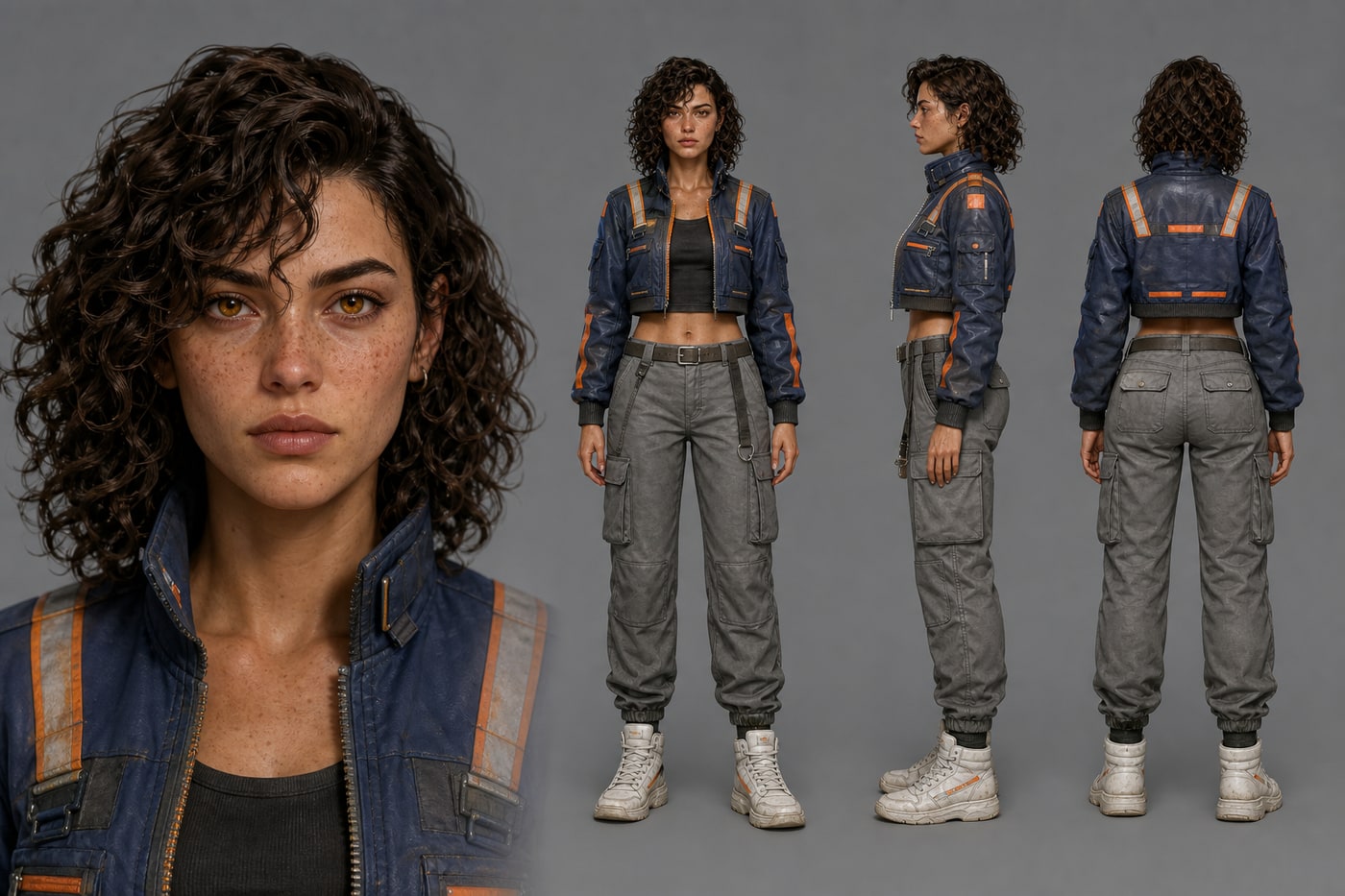
The received wisdom — and the earlier draft of this post — says text-only turnarounds give you four siblings instead of one character. That is not what happened. The layout landed exactly as asked, and the front, side and back views are recognisably the same person in the same clothes: jacket cut, orange strips, cargo pockets, boots all line up.
The drift is real but it sits somewhere else: the oversized close-up on the left is not quite the same face as the small full-body figures on the right. The close-up reads older, longer in the face, higher in the cheekbone; the small figures read younger and rounder.
This happened in all three runs, and the run above is the best of them. In the other two the wardrobe drifted as well — stripe colours, stripe placement and a shoulder strap that appears at one scale and not the other:
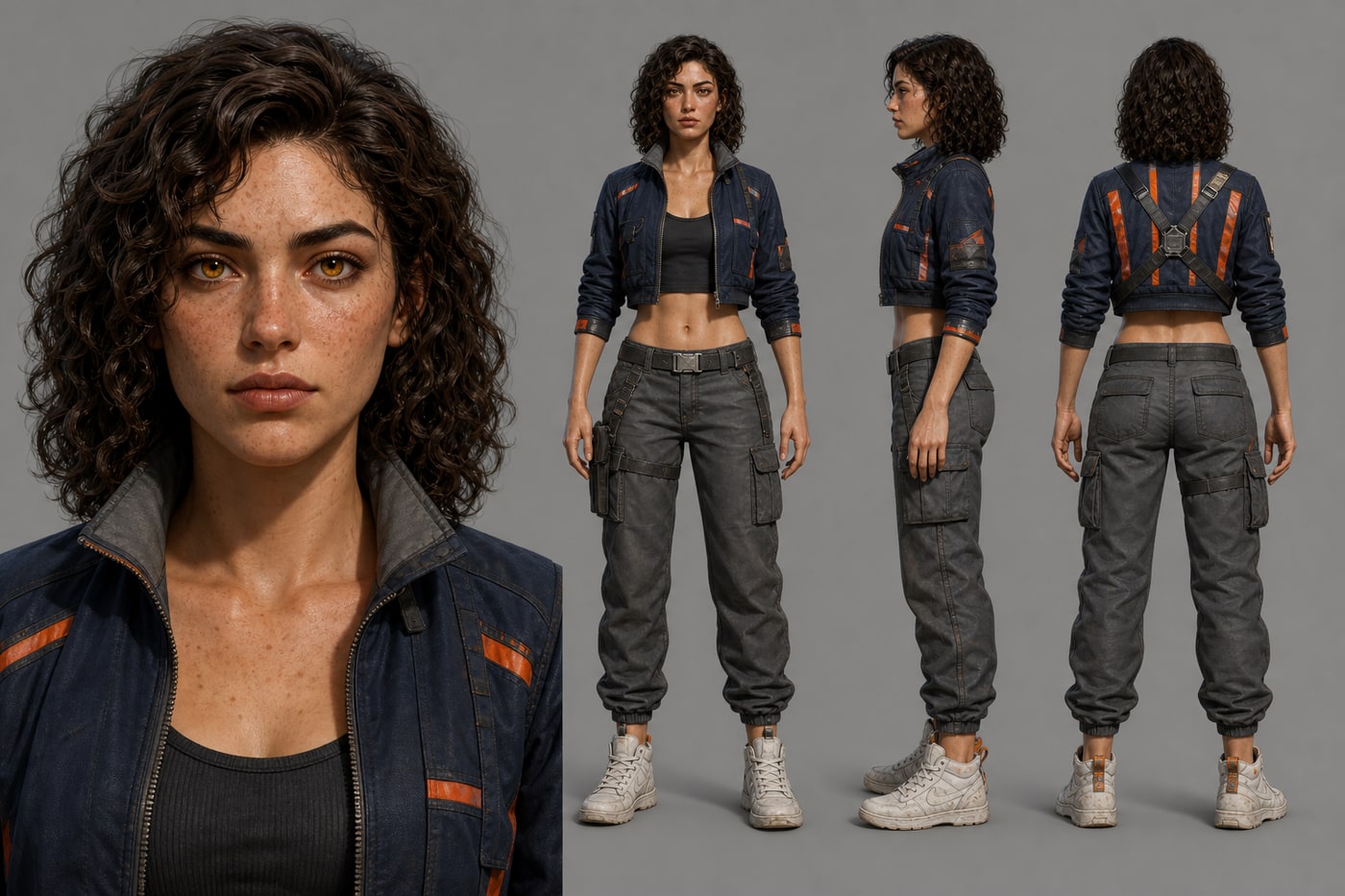
So the honest version of the rule is not "different views drift." It is different scales drift — a face rendered at 900px and the same face rendered at 90px are two different generation problems, and the model solves them separately. The small figures agree with each other; it's the close-up that goes its own way.
The other thing three runs made obvious: each run invented a different woman. Same prompt, three characters. Fine if you want one sheet. Fatal if you wanted her again tomorrow.
Prompt 2 — reference image + the full constraint block
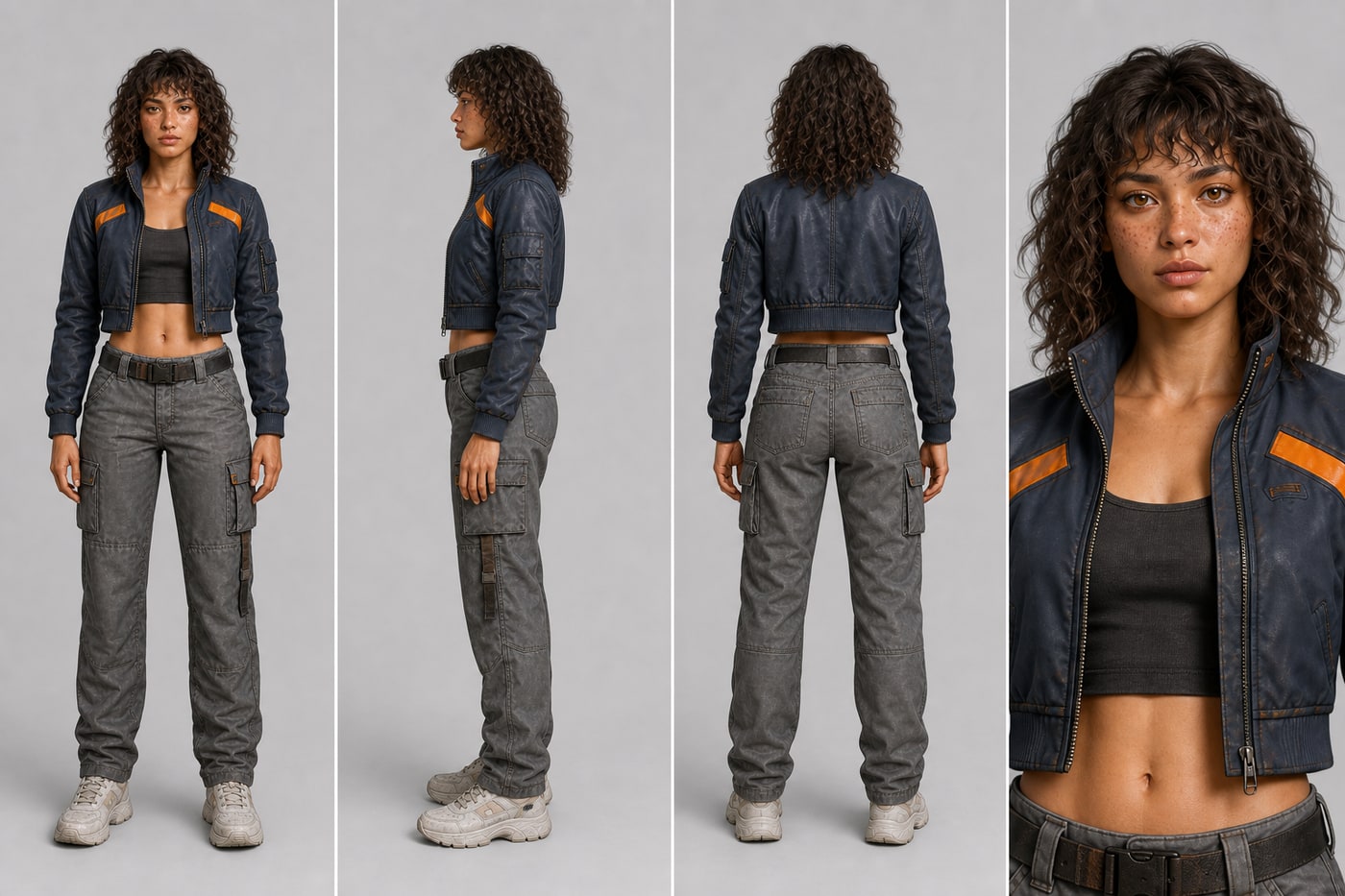
Clean four-cell sheet, identity holds across all four, no text anywhere — the no text constraint did its job, 3 times out of 3.
One thing it got wrong, also 3 times out of 3: the prompt explicitly asked for PORTRAIT — head-and-shoulders close-up, and every run returned a half-body crop down to the waist instead. Not a fluke — a consistent miss.
Prompt 3 — same reference, one line of constraint
The whole consistency instruction here was two words: Consistent character.
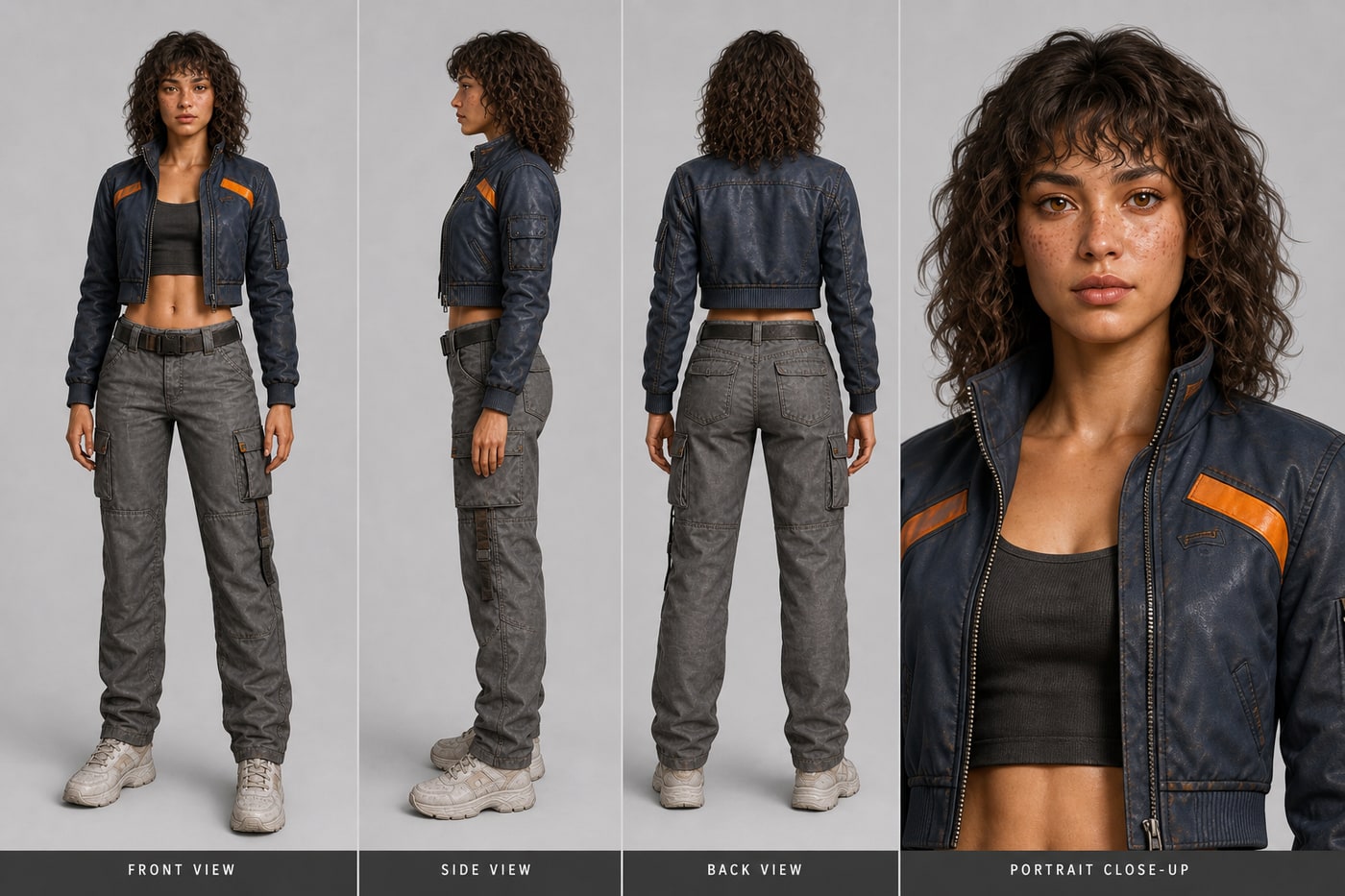
This is the result that overturned the article. Identity held in all three runs, just as well as the strict version — and the portrait cell was framed as an actual head-and-shoulders crop in 3 out of 3, which is precisely what the strict prompt asked for and never got.
What the minimal prompt did not control is the page. All three runs added their own label bar — FRONT VIEW / SIDE VIEW / BACK VIEW / PORTRAIT — uninvited. The strict prompt has no labels, because it said no text.
That is the actual division of labour, and it isn't the one this article started with:
- Identity consistency — GPT Image 2 largely handles it on its own, from a reference image, with minimal prompting.
- The constraint block — earns its place by controlling the page: text, background, extra characters, cell count. Not by holding the face steady.
Caveat on the numbers: three runs is enough to tell a consistent behaviour from a fluke, and every column above came out 3/3 or 0/3 — no split results. It is not enough to quote as a success rate. Treat 3/3 as "this is what it does", not as "this always works".
The full-kit case: eight modules on one page
Prompt 4 plus one character reference image, image-to-image on GPT Image 2.5 Sunburst:
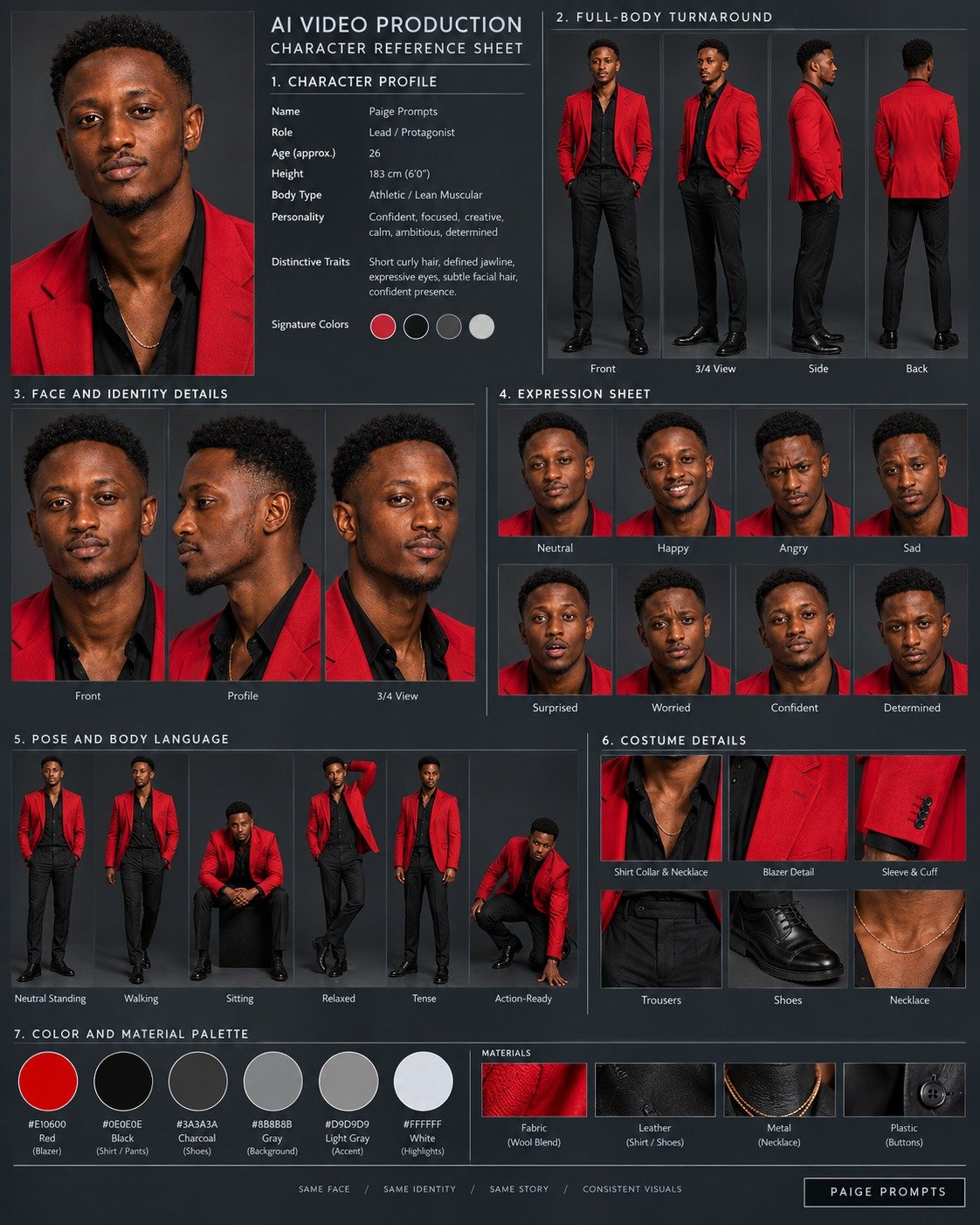
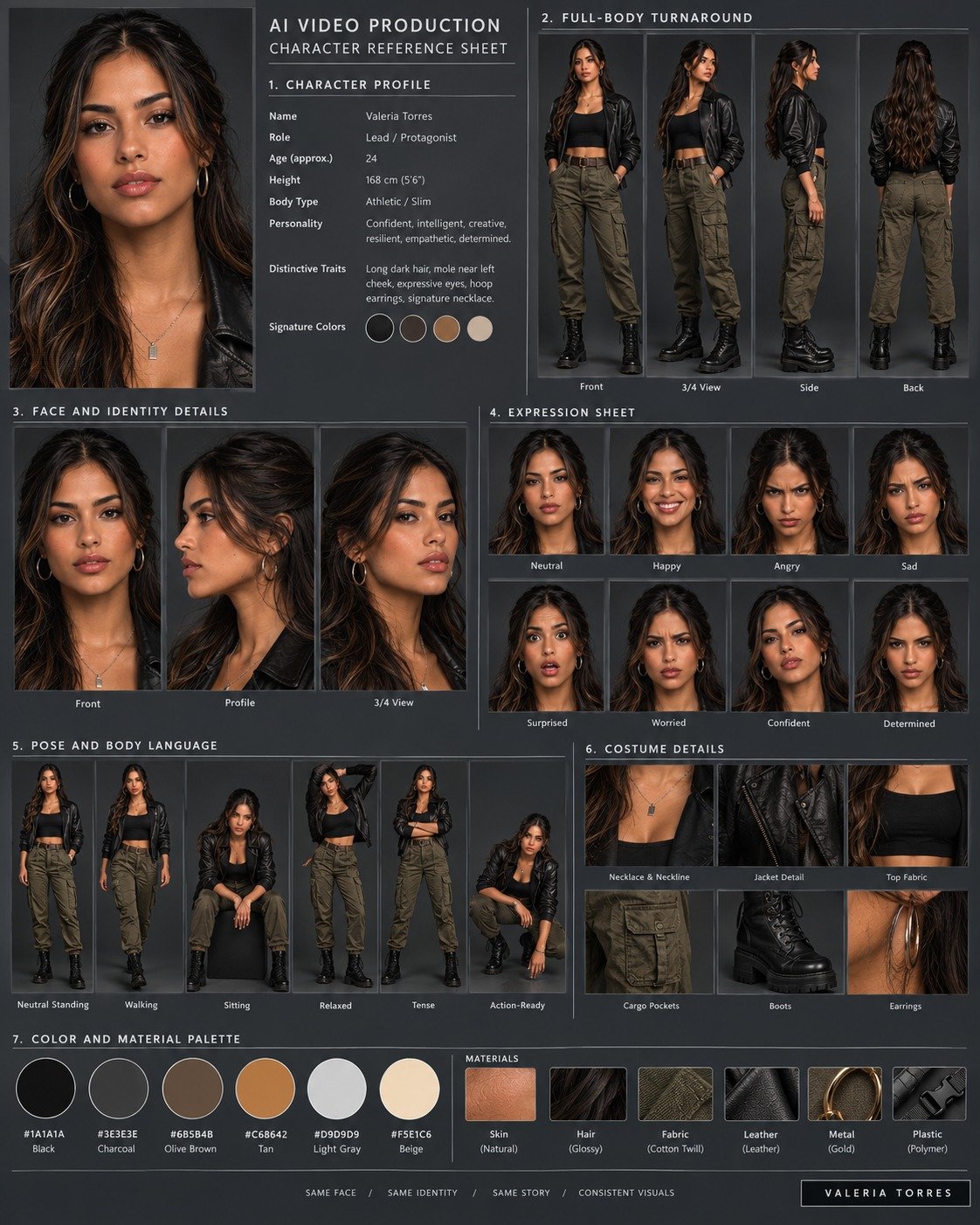
The prompt:
Create a professional AI Video Production — Character Reference Sheet for the provided character image. Create a polished 4:5 portrait continuity sheet focused exclusively on the character:

1. CHARACTER PROFILE — name, role, approximate age, height, body type, personality, distinctive traits, and signature colors.
2. FULL-BODY TURNAROUND — front, 3/4, side, and back views of the exact same character at matching scale, with identical facial features, hairstyle, body proportions, costume, colors, and accessories.
3. FACE AND IDENTITY DETAILS — front, profile, and 3/4 head-and-shoulder close-ups showing facial structure, eyes, eyebrows, nose, lips, hairstyle, skin tone, makeup, scars, tattoos, and other defining features.
4. EXPRESSION SHEET — neutral, happy, angry, sad, surprised, worried, confident, and determined expressions. Preserve the exact same facial structure and identity in every expression.
5. POSE AND BODY LANGUAGE — neutral standing, walking, sitting, relaxed, tense, and action-ready poses. Maintain consistent anatomy, proportions, posture, and silhouette.
6. COSTUME DETAILS — close-ups of clothing layers, fabrics, seams, fasteners, footwear, jewelry, eyewear, markings, logos, and other character-defining wardrobe elements.
7. COLOR AND MATERIAL PALETTE — include 4–6 key colors with HEX codes, plus references for skin, hair, fabric, leather, metal, plastic, armor, or other visible materials.
8. DO NOT CHANGE — lock the character's face, identity, skin tone, age, hair, eye color, body shape, proportions, costume, accessories, markings, colors, and defining features. Do not redesign, beautify, age, stylize, simplify, or create alternate versions.

Use a clean dark gray studio background, soft controlled lighting, realistic materials, sharp details, subtle shadows, clean typography, thin dividers, balanced spacing, and a sophisticated editorial production-design grid.

Every panel must depict the exact same character with absolute visual consistency. Focus only on the character. Do not include props, additional characters, environments, unrelated objects, or alternate outfits.
What actually breaks — and what doesn't
Scale changes break identity; angle changes mostly don't. 0/3 text-only runs kept the big close-up consistent with the small figures, while 3/3 kept the small figures consistent with each other. If your sheet mixes a big close-up with small full-body figures, generate the close-up as its own pass.
"Consistent character" is not weaker than an enumerated list — at least not here. Across three runs each, the two-word version matched the long enumerated block on every identity measure. The long version (same face, same hairstyle, same outfit, same proportions, same color palette) remains a reasonable default on a hard case, but don't assume the length is what's saving you. It didn't win once.
Constraints control the page, not the character. Anything on the sheet that isn't the character — labels, background, cell count, no duplicated limbs — has to be written down. The minimal prompt added an uninvited label bar in 3 runs out of 3; the strict prompt, which said no text, had none in 3 out of 3. That's the constraint block earning its keep, and it has nothing to do with the face.
Over-constraining can cost you the framing. This was the sharpest result of the lot. The strict prompt spelled out PORTRAIT — head-and-shoulders close-up and got a half-body crop 3 times out of 3. The minimal prompt never mentioned framing and got head-and-shoulders 3 times out of 3. More words is not monotonically better — a long instruction list appears to dilute any single instruction in it.
One prompt for everything is worse than three prompts. Turnaround, expression sheet and outfit details each want different framing and cell counts. Generate them separately and compose the final sheet yourself. The full-kit case above shows that fitting everything on one page is possible now. The cost is that every panel is small, which makes the result an overview, not reference material.
Unspecified attributes are drift waiting to happen. Anything you don't pin — sleeve length, shoe type, whether the jacket is zipped — the model re-decides each run.
Small text on the sheet: it renders, but don't trust what it says. In the full-kit case above, labels and hex codes came out sharp. But the name, age and height in the profile are made up by the model, and hex codes should be checked with a color picker. Any text you need as a spec still belongs in an annotation layer you add in Figma or Photoshop.
The two-step workflow — and why it still matters
Given that the text-only run above worked, you could reasonably ask why you'd bother with a reference image at all. The answer is not consistency within one sheet. It's consistency across everything you generate later.
The character in the text-only sheet is one the model invented on the spot. Run the same prompt tomorrow and you get a different person — same description, different face. There is nothing to point at and say "her." A baseline image gives you that anchor.
- Lock the baseline. Generate single full-body renders until one is right. From that moment the character is this image, not that paragraph.
- Expand from the baseline. With that image as reference, generate the turnaround, then the expression sheet, then detail close-ups — each as its own pass.
- Compose and annotate. Lay the outputs out and add labels, hex values and measurements as real text, outside the model.
So: if you need one nice sheet, text-only is genuinely enough on GPT Image 2. If you need this character to still be this character across a comic, a game, or twenty social posts, lock a baseline first.
FAQ
Is a character sheet prompt different from a turnaround prompt? A turnaround is the multi-angle portion — front, side, back, ¾. A character sheet is the broader document that usually contains a turnaround plus expressions, detail shots and a palette. In search, people use the terms interchangeably.
How many expressions should I ask for? Six to ten in one pass. Past that the cells shrink and facial consistency degrades. Run a second pass for more rather than pushing one grid wider.
Can I do this from a photo of a real person? Yes — that's prompt 2 above, and it's the most reliable route. Use photos you have the right to use.
Will the sheet keep working across different art styles? Partially. You can shift medium (manga → semi-realistic → cartoon) while holding identity, but expect some drift at large style jumps. Re-anchor with the reference image on each style change.
What resolution should I generate at? The largest your plan allows. A character sheet is a multi-panel image — each cell only gets a fraction of the total pixels, so a sheet needs more resolution than a single portrait to stay usable.
Ready to build your character?
Generate first, pay later
3 free credits on signup. Watermark-free preview. Pick a plan when you're sold.
Stuck on a character that won't hold still across generations? Email us at support@imagesv2.ai — we read every message.