
GPT Image 2.6: Turn One Sentence into an Animated GIF or Editable SVG
Flare for speed, Sunburst for detail. Stills in about 11 seconds; GIFs with up to 16 frames, three speeds, transparent backgrounds — or animate a picture you upload; SVGs whose text you can edit directly.
Three things GPT Image 2.6 changes
Every number below comes from our own tests on imagesv2 on November 5, 2026.
- Still images
- ~11 s
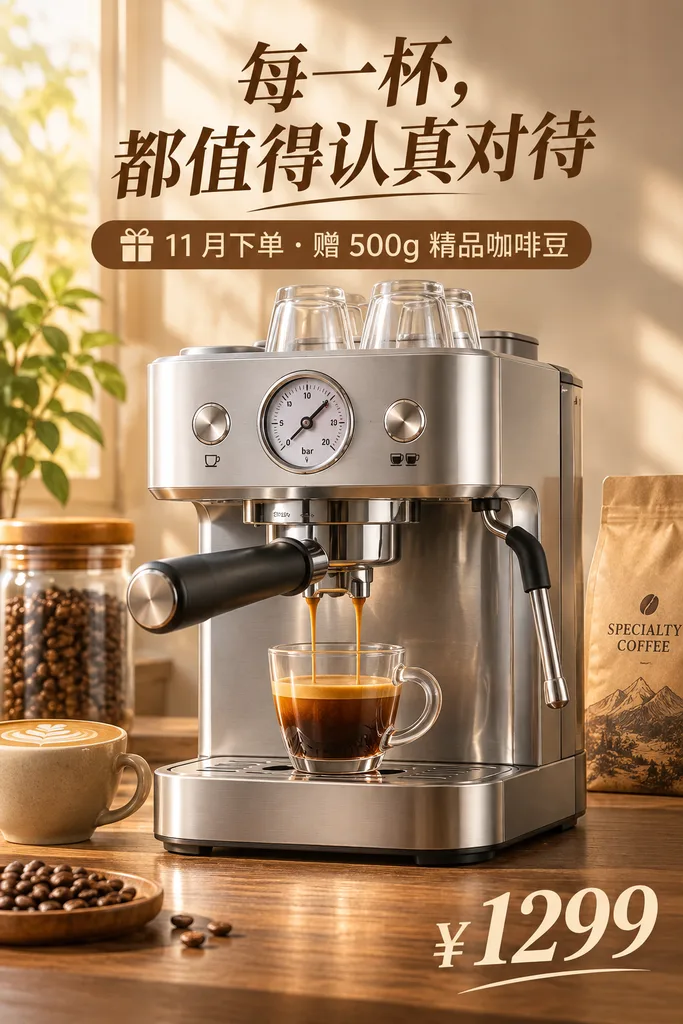
- Same poster prompt: 2.6 Flare 11 s, GPT Image 2 33 s — text correct in both.
- Animated GIF
- 16 frames
- 4–16 frames, three playback speeds, transparent backgrounds, or start from your own picture.
- SVG vectors
- Editable
- Text in posters, infographics and paper figures stays editable, so you can reword without redrawing.
- Flare / Sunburst
- Same price
- Flare for speed, Sunburst for detail — both cost the same credits.
Same prompt, 3× faster
Portrait e-commerce poster with Chinese text, both at medium quality.

Upload a picture, make it move
In Edit, upload a character or product image, choose GIF and describe the motion. The look stays the same.


Real results — remix any of them in one click
All generated with GPT Image 2.6 on imagesv2, no retouching. Times are measured; credits are what the same result costs you today.

Slack, Discord and code-review replies.
Animated banners for online stores and email campaigns.

Birthday cards and chat stickers.
Product pages and ad slots: a light sweep across the glass, petals drifting.
Character previews for animation and short drama: blinking, hair and curtain in the breeze. Made with Sunburst.
Turn an existing character or mascot image into a waving, blinking GIF.
Indie game prototypes and motion tests, 8 frames.
Welcome animations, empty states and social avatars.

Transparent background — clean on any color.
More frames, smoother motion: squash on impact, stretch on the rebound.

Group chat replies — the caption stays sharp on every frame.

Store banners and live-stream overlays, 2:1 landscape.

Holiday greetings and community posts.
GPT Image 2.6 vs 2.5 vs 2
All three are available on imagesv2. Here's how they compare in features and price.
| GPT Image 2.6 | GPT Image 2.5 | GPT Image 2 | |
|---|---|---|---|
| Still image speed (measured) | about 9–15 s (Flare) | about 16 s (Sunburst) | about 28–33 s |
| Animated GIF | ✅ 4–16 frames, 3 speeds, transparent | — | — |
| Picture to GIF | ✅ | — | — |
| SVG vector | ✅ Native vector, editable text | Traced vector (text not editable) | Traced vector (text not editable) |
| Transparent background | ✅ Native | ✅ Native | ✅ Auto cut-out (+10 credits) |
| Quality levels | Five, low – max | Five, low – max | low / medium / high |
| Composition freedom | ✅ Three levels | — | — |
| Reference images | Up to 16 | Up to 16 | Up to 10 |
| 1024² still, credits | low 30 · medium 50 · high 60 | low 10 · medium 40 · high 60 | low 10 · medium 40 · high 110 |
| Best for | Animation, vectors, speed | Top quality, many references | Lowest-cost everyday images |
Credits are per 1024×1024 image; 2.5 and 2.6 scale with pixel area. Speeds measured on imagesv2 on 2026-11-05.
Flare or Sunburst?
Both cost the same, so choose by whether you need speed or detail.
| You want | Pick | Why |
|---|---|---|
| Drafts, everyday social posts, trying ideas fast | Flare | Stills take about 10 seconds, so iterating barely waits. |
| Memes, greetings, sale banners as GIF | Flare | Captions and simple motion are already stable on Flare, about 10–18 seconds. |
| Product shots, detailed illustration, repeated edits | Sunburst | Better detail and consistency between edits; takes longer. |
| Character animation with expressive detail | Sunburst | Expressions and hair look more natural; about 28 seconds in our test. |
| SVG vectors | Either | Most of the time goes into drawing the vector (30–90 s); versions differ little. |
What people make with GPT Image 2.6
Built from the most common requests on imagesv2 — each row has a matching example above.
| You are | Make | Suggested settings |
|---|---|---|
| Animation / short-drama creator | Character idle loops, storyboard frames, character turnarounds | Sunburst · GIF 9 frames · portrait; stills for storyboards |
| Researcher / student | Model architecture, mechanism and flow diagrams with editable labels | SVG · landscape · list modules and arrows in order |
| E-commerce marketer | Product loops, flash-sale banners, sale posters | GIF 9 frames (2:1 for banners) or SVG posters |
| Designer / developer | Icon sets, website illustrations, isometric assets, transparent stickers | SVG, or PNG with transparent background |
| Community / social media manager | Reaction GIFs, holiday greetings, birthday animations | GIF 6–9 frames · add a short caption |
GIF frames, size and credits
More frames move more smoothly; each frame gets a little smaller.
| Frames | Long edge per frame | Credits (low / medium / high) | Good for |
|---|---|---|---|
| 4 | 768 px | 30 / 50 / 60 | Simple nods and blinks |
| 6 (default) | 768 px | 50 / 80 / 90 | Reaction stickers, waves |
| 9 | 768 px | 70 / 120 / 140 | Product loops, captioned GIFs |
| 12 | 640 px | 60 / 110 / 130 | Smoother motion |
| 16 | 512 px | 50 / 90 / 110 | Runs, bounces and other continuous motion |
Prices are for square frames; portrait and landscape scale with area. Playback speed (slow / normal / fast) doesn't affect price. Making a GIF from an uploaded picture adds 20 credits per reference image.
What SVG is good for — and what it isn't
From our tests. Each SVG costs 180–210 credits (low – high) and usually takes 30–90 seconds.
| Type | Result | Tip |
|---|---|---|
| Paper diagrams, flowcharts, swimlanes | Excellent — labels stay editable | List modules, arrows and branches in order |
| Infographics, sale posters | Excellent — titles and body text stay editable | Write the text as content: headings, step labels |
| Icon sets, flat illustration, isometric assets | Excellent | Specify colors, stroke width and whether to use a transparent background |
| Seamless tiling patterns | Choose "Seamless pattern" | Native vectors don't guarantee a seamless tile |
| Logo wordmarks, large calligraphy | Not recommended | Lettering gets drawn as shapes and distorts; make the symbol only and add text later |
| Strict diagrams such as sequence diagrams | Occasionally fails | We retry automatically; if it still fails you get a traced vector and a price refund |
| Converting an uploaded image | Uses tracing | Native vectors are text-to-image only for now |
10 tips for better GPT Image 2.6 prompts
Learned from 52 test runs — follow them for higher success rates.
Animated GIF
- 1. Describe a starting pose and ask to return to itMatching first and last frames make the loop seamless.
- 2. Add "camera still"Keeps the whole frame from shaking so the motion reads clearly.
- 3. Say the caption "stays the same every frame"Chinese and English captions both held steady in our tests.
- 4. Describe one action at a timeToo much motion in 9 frames looks jumpy; use 12–16 frames for continuous moves.
- 5. Choose a transparent background for stickersTransparent GIFs keep clean edges even on dark backgrounds.
SVG vector
- 1. Write text as content, not as a logo wordmarkHeadings and labels become editable text; wordmarks get drawn as shapes and distort.
- 2. Name the colors and stroke widthVectors come out more consistent and are easy to recolor later.
- 3. List diagram steps and branches in orderSwimlanes and architecture diagrams come out structurally correct.
- 4. Use "Seamless pattern" for tilesIt's the only option that guarantees a seamless repeat at any size.
- 5. Keep photorealism for PNGComplex lighting turns into huge path counts that are hard to edit.
Plans & Pricing of GPT Image 2
Every plan includes everything GPT Image 2.6 can do: stills, animated GIFs, SVG vectors, transparent backgrounds and image-to-image. Pay with credits; Flare and Sunburst cost the same.
GPT Image 2 Flash Sale
Limited-Time 50% OFF
Cancel anytime.
Starter
Save $51 annually · $0.0042 per credit
Includes
- 12,000 credits added at once when you pay
- ≈ 100 Standard / 25 Medium images per month
- 1,000 credits expire every 30 days; you can use later months' credits early
- 6 months free vs monthly
- All generation features
- Commercial license
- Watermark-free downloads
- Cancel anytime
Pro
Save $207 annually · $0.0033 per credit
Includes
- 60,000 credits added at once when you pay
- ≈ 500 Standard / 125 Medium images per month
- 5,000 credits expire every 30 days; you can use later months' credits early
- 6 months free vs monthly
- 20% cheaper per credit than Starter
- All generation features
- Priority generation queue
- Commercial license
- Priority support
- Watermark-free downloads
- Cancel anytime
Ultra
Save $519 annually · $0.0021 per credit · lowest
Includes
- 240,000 credits added at once when you pay
- ≈ 2,000 Standard / 500 Medium images per month
- 20,000 credits expire every 30 days; you can use later months' credits early
- 6 months free vs monthly
- 50% cheaper per credit than Starter
- All generation features
- Highest priority generation
- Early access to new models
- Dedicated customer support
- Commercial license
- Watermark-free downloads
- Cancel anytime
GPT Image 2.6 FAQ
What 2.6 can do, which version to pick, how GIF and SVG work, and what it costs.
GPT Image 2.6 is the image model OpenAI released on November 4, 2026, in two versions: Flare (faster) and Sunburst (more detailed). The biggest change from 2.5 is that it creates looping animated GIFs and SVG vectors directly, and stills come out faster: in our test of the same Chinese-language poster, 2.6 Flare took about 11 seconds versus about 33 seconds for GPT Image 2.
Pick Flare when speed matters: stills take about 10 seconds and it handles memes, greeting GIFs and everyday visuals well. Pick Sunburst for detail: it holds up better on product shots, detailed illustrations, character animations and repeated edits, and takes longer. Both cost the same, so draft with Flare and refine the winner with Sunburst.
Yes. Switch to Edit, upload a character, mascot or product image, choose GIF as the output format and describe the motion, for example "wave and blink, then return to the starting pose." The character keeps its look. GIF can't be combined with a mask, so delete any saved mask first.
Choose 4, 6, 9, 12 or 16 frames. Up to 9 frames each frame is 768 px on the long edge, 12 frames 640 px, 16 frames 512 px. More frames move more smoothly and cost more credits. Playback speed has three settings — slow, normal, fast — and doesn't change the price. Each run produces one GIF.
Yes. Set the background to transparent and the GIF keeps clean edges on both dark and light backgrounds — handy for stickers, animated website icons and stream overlays.
It's a real vector, not a picture wrapped in an SVG file. Titles and labels in posters, infographics and paper figures are saved as editable text, so you can change wording or colors in Figma, Illustrator or a code editor without regenerating. Text renders with system fonts.
Logo wordmarks and large calligraphy aren't recommended: that lettering gets drawn as shapes and can distort, so generate the symbol only and add the name afterwards. For a pattern that tiles seamlessly, choose "Seamless pattern." Converting an uploaded image to SVG uses tracing, because native vectors are text-to-image only.
An SVG is drawn from a reference image and then traced into vector paths, which usually takes 30–90 seconds. If a run fails we retry once automatically; if it still fails we deliver a traced vector instead and refund the price difference. If nothing can be delivered, all credits are refunded.
You pay with credits. Flare and Sunburst cost the same, and the price depends on quality and size. A 1024×1024 still costs 30 (low), 50 (medium) or 60 (high) credits; an SVG costs 180, 200 or 210; a 6-frame 768 px GIF costs 50–90. Editing an uploaded image adds 20 credits per reference image. The Generate button always shows the exact cost before you click.
No. imagesv2 lets you use GPT Image 2.6 in your browser with credits. New accounts get free credits, no credit card required.
Try GPT Image 2.6 now
Free credits for new accounts. Describe an animation in one sentence, or upload a picture and make it move.
