
Batch Image Upscaler: Upscale 20 Images at Once
Stop upscaling one picture at a time. Add up to 20 images, choose 2K or 4K, and download every result in a single ZIP.
Image type
Output size
20 credits per image
New accounts get 3 free credits — exactly enough for your first generation.
Results made with the free sign-up credits carry a watermark. Any credit purchase removes it from new results.
Only one image? Use the single image upscaler →The same quality as a single upscale
Every image in a batch goes through the same AI upscaler. These are close-up crops: original on the left, result on the right.
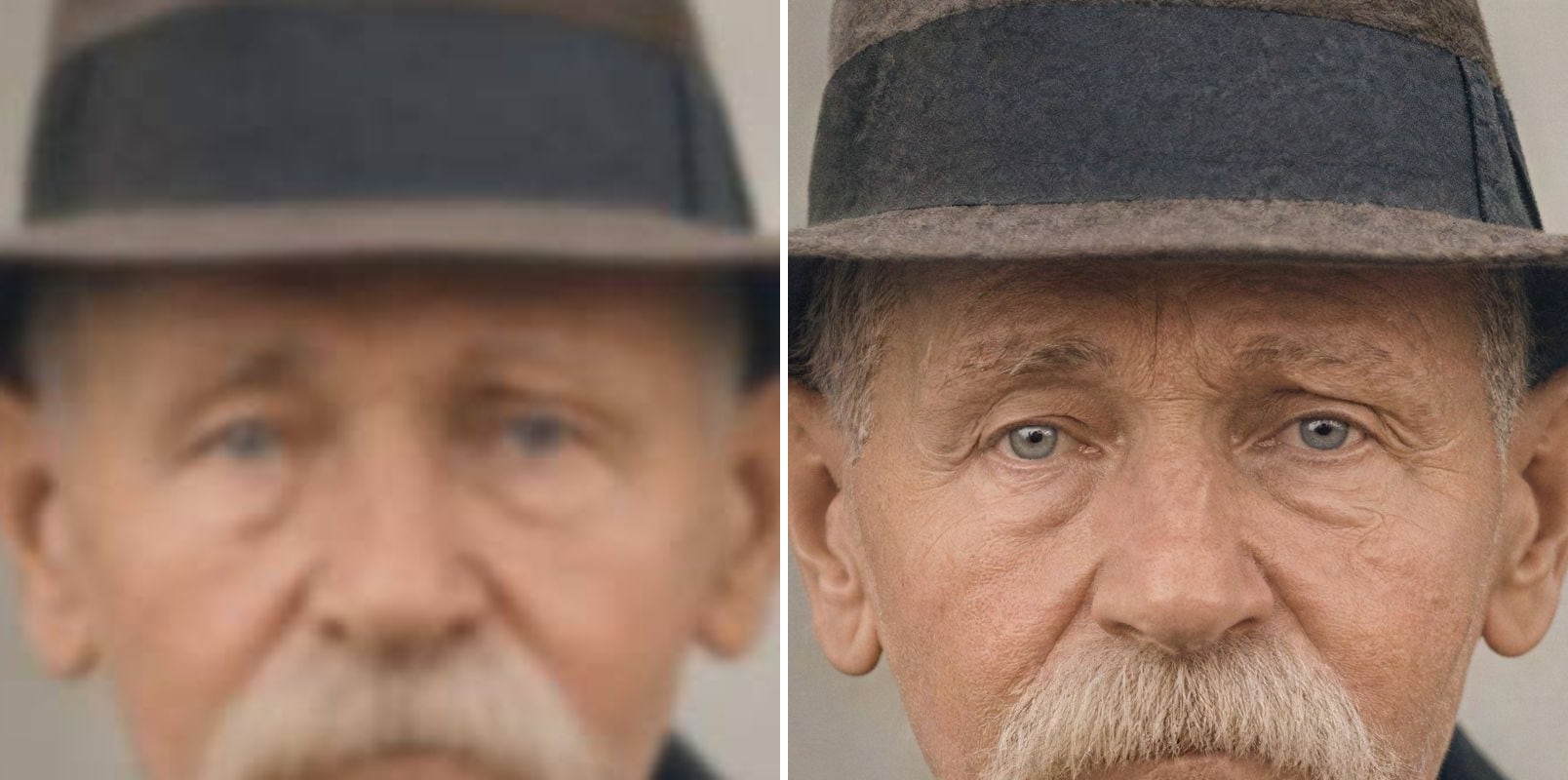
- Before
- Out of focus: eyes and wrinkles melt together, and the hat shows no texture.
- After
- Eyes, wrinkles and moustache are sharp, and the hat’s felt texture is back.
Portraits for client galleries
Soft or low-resolution portraits come back with sharper eyes, hair and fabric. Very blurry faces can change slightly, so check important portraits before delivery.

- Before
- Small text is fuzzy and speckled; icon and headline edges are jagged.
- After
- Small text is sharp and readable; the badge outline, icon and headline edges are clean.
Graphics and marketing assets
Small banners and posters get cleaner edges and lettering. Check small text after upscaling, as the AI can alter characters that were already unreadable.
What is a batch image upscaler?
A batch image upscaler enlarges many images in one run instead of one by one. It saves the repetitive part of the job: uploading, waiting and downloading each file.
One setting for the whole batch
Choose the image type and output size once. Run photos and anime as separate batches for the best result.
Clear cost before you start
The total credit cost is shown up front. Images already at the chosen size are skipped and not charged.
Failures don't sink the batch
Each image runs on its own. If one fails, its credits are refunded and you can retry just that image.
How to upscale images in bulk
Three steps, no software to install:
Add your images
Drop or select up to 20 JPG, PNG or WebP files, each up to 10 MB.
Choose type and size
Pick Photo or Anime & art, then 2K or 4K. Check the output sizes and the total cost.
Download the ZIP
Keep the page open while each image finishes, then download them all as a ZIP or one at a time.
Who upscales images in bulk
Anyone with a folder of pictures that are too small.
Online sellers
Enlarge supplier photos so a whole catalog holds up in zoom views.
Photographers
Prepare older or cropped shots from a shoot before delivering the gallery.
Print shops
Bring customer files closer to the pixel size a print job needs.
Designers and marketers
Refresh old banners, slides and social assets in one go.
Family archivists
Enlarge a set of scanned photos. Scratches and tears stay, so use photo restoration for those.
Anime and art fans
Upscale a set of illustrations or screenshots for wallpapers.
Batch Image Upscaler — FAQ
More questions? Email support@imagesv2.ai.
Up to 20 images per batch, each up to 10 MB. For more, finish a batch and start another.
The same as single images: 10 credits per image for 2K and 20 credits for 4K. The total is shown before you start. Your first upscale costs just 3 credits.
One image usually takes 15–60 seconds, and several run at the same time, so the total depends on the batch size. Keep the page open until it finishes.
The rest of the batch continues. The failed image's credits are refunded, and you can retry it without uploading it again.
The cost is checked before you start. If your balance still runs out, images in progress finish and the rest stay in the list until you top up.
The whole batch uses one image type, so it is better to run photos and anime separately.
Results made with the free sign-up credits carry a watermark. Any credit purchase removes it from new results.
No. The AI predicts missing detail, so very blurry faces and tiny text can change. Check images where accuracy matters.
Upscale your whole folder
Free credits for new users. Add up to 20 images and download them all as a ZIP.